三种进程遍历的方式
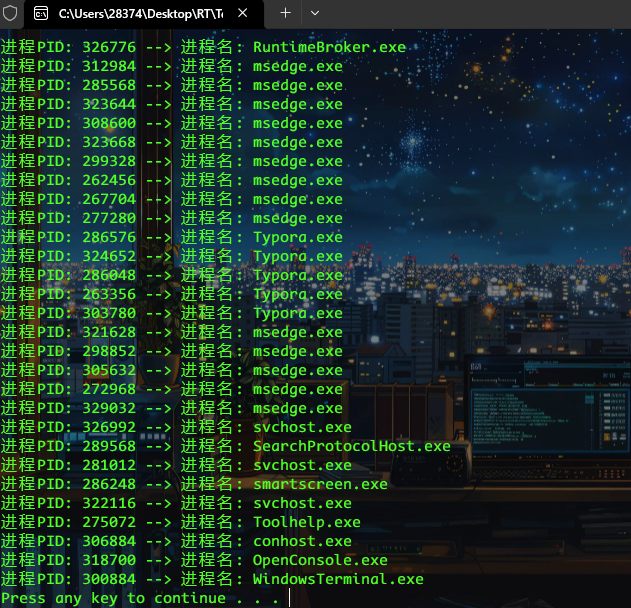
一、Toolhelp API 进程遍历
#include <Windows.h> #include <stdio.h> #include <TlHelp32.h> int EnumProcess() { PROCESSENTRY32 pe32 = { 0 }; // 定义并初始化PROCESSENTRY32结构体(存储单个进程的信息) pe32.dwSize = sizeof(PROCESSENTRY32); //初始化结构体中 dwSize ,API强制要求 // 获取全部进程快照 HANDLE hProcessSnap = CreateToolhelp32Snapshot(TH32CS_SNAPPROCESS, 0); // CreateToolhelp32Snapshot 创建系统快照的API // TH32CS_SNAPPROCESS 参数 即快照类型为“所有进程” if (INVALID_HANDLE_VALUE != hProcessSnap) // 检查快照是否创建成功 { // Process32First 获取快照中第一条信息 BOOL bRet = Process32First(hProcessSnap, &pe32); // 循环遍历快照内容获取所有进程 while (bRet) { printf("进程PID: %-5d --> 进程名: %s \n", pe32.th32ProcessID, pe32.szExeFile); // 获取快照中下一条信息 bRet = Process32Next(hProcessSnap, &pe32); } CloseHandle(hProcessSnap); } return 0; } int main(int argc,char * argv []) { EnumProcess(); system("pause"); return 0; }
编译链接
gcc -o Toolhelp.exe ToolhelpAPI.c
二、EnumProcesses 进程遍历
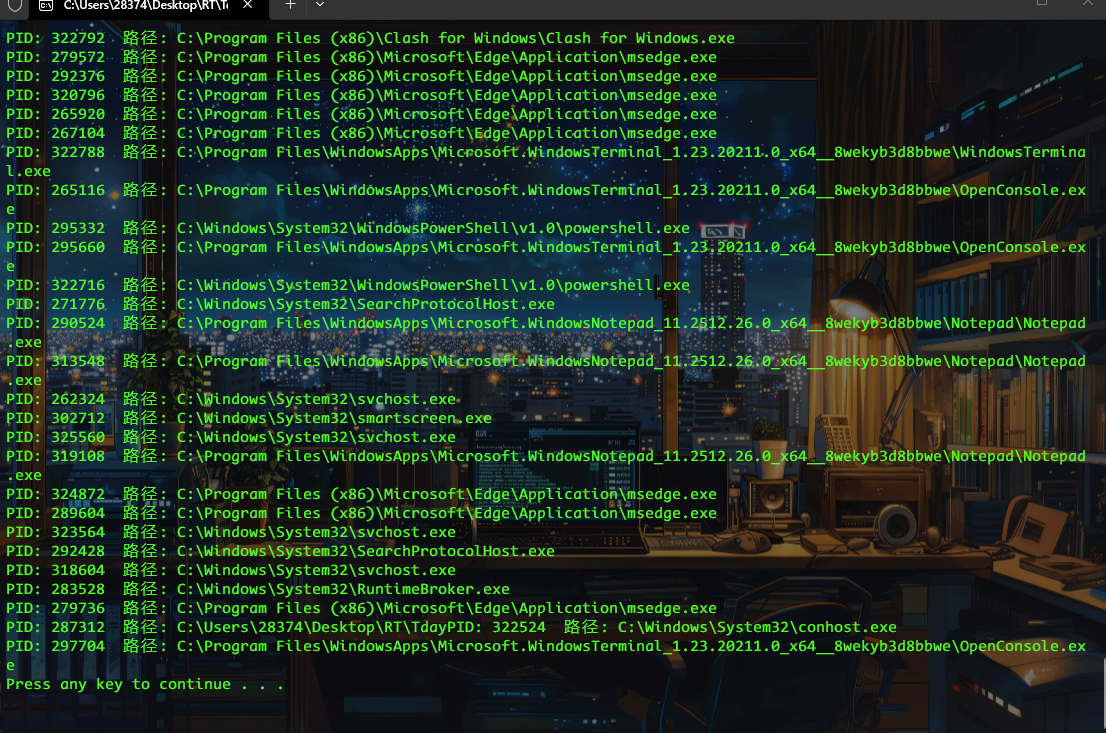
应用PSAPI实现
#include <windows.h> #include <psapi.h> #include <stdio.h> int main() { DWORD pids[1024], bytesReturned; EnumProcesses(pids, sizeof(pids), &bytesReturned); int count = bytesReturned / sizeof(DWORD); for (int i = 0; i < count; i++) { if (pids[i] == 0) continue; HANDLE hProc = OpenProcess(PROCESS_QUERY_LIMITED_INFORMATION, FALSE, pids[i]); if (hProc) { WCHAR name[MAX_PATH] = L"<unknown>"; DWORD size = MAX_PATH; QueryFullProcessImageNameW(hProc, 0, name, &size); // Win7+ printf("PID: %u 路径: %ws\n", pids[i], name); CloseHandle(hProc); } } system("pause"); return 0; }
编译链接
gcc -o EnumPro.exe EnumPro.c -lpsapi -lkernel32 -std=c99
三、NtQuerySystemInformation 进程遍历
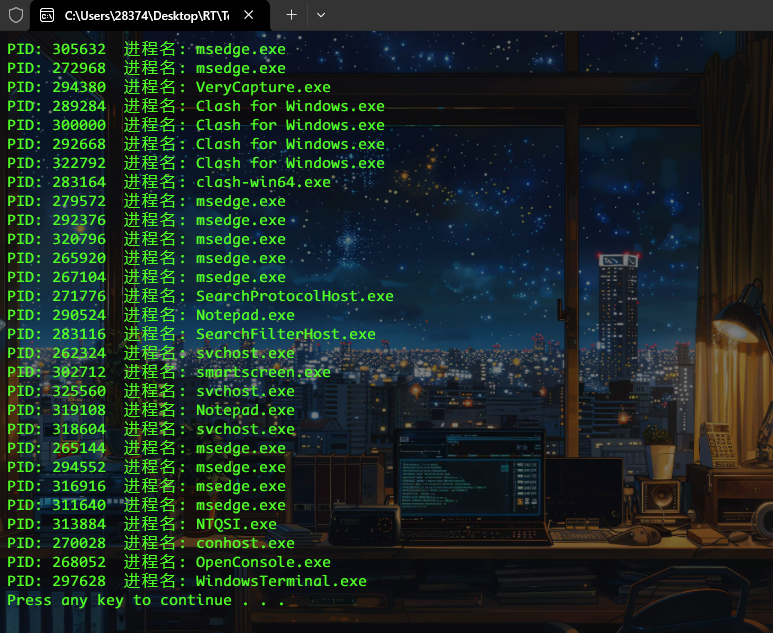
NtQuerySystemInformation是NT API用于检索指定的系统信息
我们需要的NtQuerySystemInformation
https://processhacker.sourceforge.io/doc/ntexapi_8h_source.html
#include <windows.h> #include <stdio.h> typedef struct _UNICODE_STRING { USHORT Length; USHORT MaximumLength; PWSTR Buffer; } UNICODE_STRING, * PUNICODE_STRING; typedef LONG KPRIORITY; typedef struct _SYSTEM_PROCESS_INFORMATION { ULONG NextEntryOffset; ULONG NumberOfThreads; BYTE Reserved1[48]; UNICODE_STRING ImageName; KPRIORITY BasePriority; HANDLE UniqueProcessId; PVOID Reserved2; ULONG HandleCount; ULONG SessionId; PVOID Reserved3; SIZE_T PeakVirtualSize; SIZE_T VirtualSize; ULONG Reserved4; SIZE_T PeakWorkingSetSize; SIZE_T WorkingSetSize; PVOID Reserved5; SIZE_T QuotaPagedPoolUsage; PVOID Reserved6; SIZE_T QuotaNonPagedPoolUsage; SIZE_T PagefileUsage; SIZE_T PeakPagefileUsage; SIZE_T PrivatePageCount; LARGE_INTEGER Reserved7[6]; } SYSTEM_PROCESS_INFORMATION ,*PSYSTEM_PROCESS_INFORMATION; #define SystemProcessInformation 5 typedef NTSTATUS (NTAPI* pNtQuerySystemInformation)(ULONG, PVOID, ULONG, PULONG); int main() { pNtQuerySystemInformation NtQuery = (pNtQuerySystemInformation)GetProcAddress(GetModuleHandleW(L"ntdll.dll"), "NtQuerySystemInformation"); ULONG size = 0x10000; BYTE* buffer = (BYTE*)malloc(size); while (NtQuery(SystemProcessInformation, buffer, size, &size) == 0xc0000004) { // STATUS_INFO_LENGTH_MISMATCH free(buffer); buffer = (BYTE*)malloc(size *= 2); } SYSTEM_PROCESS_INFORMATION* p = (SYSTEM_PROCESS_INFORMATION*)buffer; while (p) { printf("PID: %lld 进程名: %ws\n", p->UniqueProcessId, p->ImageName.Buffer ? p->ImageName.Buffer : L"<System>"); if (p->NextEntryOffset == 0) break; p = (SYSTEM_PROCESS_INFORMATION*)((BYTE*)p + p->NextEntryOffset); } free(buffer); system("pause"); }
编译链接
gcc -o NTQSI.exe NTQSI.c
参考资料
- THE END -
非特殊说明,本博所有文章均为博主原创。
如若转载,请注明出处:https://www.oneblanks.xyz/%e8%bf%9b%e7%a8%8b%e9%81%8d%e5%8e%86%e4%b8%93%e9%a2%98/
共有 0 条评论